System Design Codex
Top Resiliency Patterns Every Developer Should Know
Saurabh Dashora
Apr 21, 2026
Top Resiliency Patterns Every Developer Should Know
Source: System Design Codex · Author: Saurabh Dashora · Date: Apr 21, 2026 · Original article
Distributed systems give us scalability and high availability, but every extra service, network hop, and dependency is also a new place where things can break. Resiliency patterns are the proactive, well-tested techniques engineers use so that when (not if) something fails, the failure stays small and the system keeps serving users.
Saurabh splits these patterns into two complementary buckets based on which side of a service-to-service call you're on:
- Downstream patterns — used by the caller. They protect you from a flaky service you depend on.
- Upstream patterns — used by the service owner. They protect your service from being overwhelmed by callers.
A robust system usually needs both. Below is a tour of seven core patterns, what each one actually does, and why it matters.
Downstream Resiliency Patterns
These patterns are implemented by a service when it talks to another service. Their job: make sure that a failure in the dependency doesn't spread back into you and trigger a domino effect.
1. Timeouts
A timeout is simply a maximum wait time for a response from a downstream service. If the dependency hasn't replied within that window, you give up on the request instead of blocking forever.

Why it matters. Without timeouts, a slow downstream service ties up your threads, connection pools, and memory. Each "hung" request keeps a resource busy that could be serving someone else, and eventually your service starves and falls over too. Timeouts contain that damage and free resources quickly so failed requests can be retried, cached, or surfaced as errors.
Implementation tips.
- Tune timeouts to the expected latency of each dependency, not a single global value. A cache lookup might use ~50 ms; a database query that does heavier work might be ~500 ms.
- Pair timeouts with monitoring of real latency percentiles (p50/p95/p99) and adjust as the system evolves.
2. Circuit Breaker
A circuit breaker watches the success/failure rate of calls to a dependency. If failures cross a threshold, it "trips" — temporarily blocking further calls — exactly like a household electrical breaker that pops to prevent a fire.
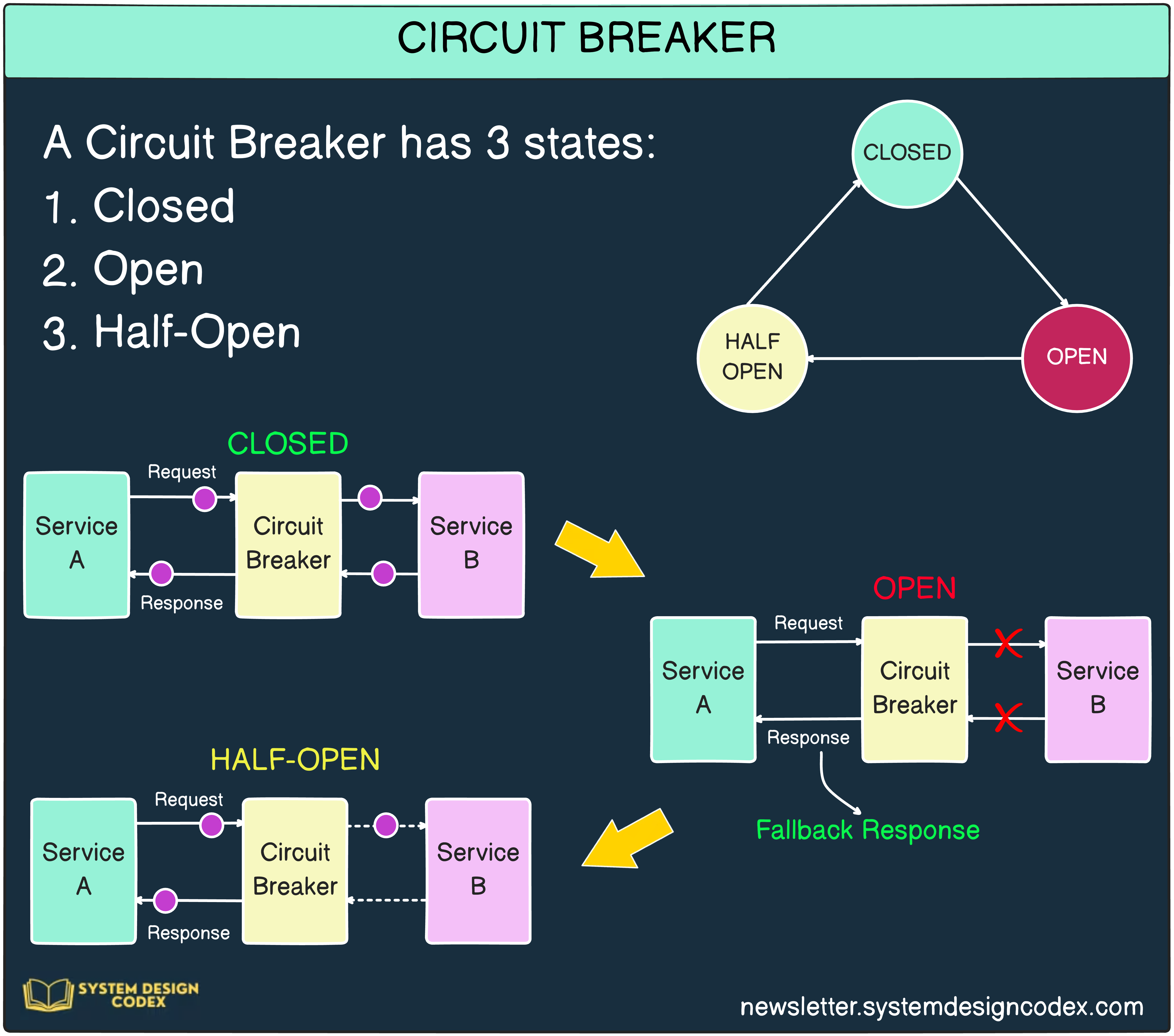
The breaker has three states:
- Closed — normal operation; requests flow through.
- Open — failures crossed the threshold; requests are rejected immediately (fail fast) without even hitting the broken dependency.
- Half-Open — after a cool-down period, a small trickle of test requests is allowed through. If they succeed, the breaker closes again; if they fail, it re-opens.
Why it matters. When a dependency is already struggling, hammering it with retries makes things worse. By failing fast in the Open state, the circuit breaker (a) protects the downstream service so it can recover and (b) protects you, because each rejected call returns instantly instead of soaking up a thread for the full timeout.
Implementation tips.
- Use a battle-tested library like Resilience4j rather than rolling your own.
- Tune the failure threshold and the time window carefully — too sensitive and you trip on noise, too loose and you don't protect anything.
3. Retries with Exponential Backoff
Many failures in distributed systems are transient — a brief network blip, a momentary GC pause, a leader election. Retrying once or twice often succeeds. But naïve retries cause two problems: they amplify load on a service that's already in trouble, and if every client retries at exactly the same intervals, you get a synchronized stampede.
Exponential backoff fixes both. After each failed attempt you wait longer, doubling the delay each time. Example schedule: 100 ms, then 200 ms, then 400 ms, up to a maximum of 5 retries.

Why it matters. Backoff gives the downstream service breathing room to recover, and dramatically improves the odds that any individual user request eventually succeeds when the underlying issue is short-lived.
Implementation tips.
- Always cap the number of retries — otherwise you can loop forever on a permanent failure.
- Add jitter (a randomized component to each delay) on top of exponential backoff. Without jitter, all clients retry at the same moments after a shared outage, producing a "thundering herd" that re-crushes the service the instant it recovers.
- Only retry idempotent operations, or you risk duplicate side effects (charging a card twice, etc.).
Upstream Resiliency Patterns
Upstream patterns are implemented by the owner of a service to keep that service healthy when traffic spikes, when a misbehaving client floods it, or when one component starts to fail.
1. Load Shedding
Load shedding is the deliberate rejection of some incoming requests when the service is overloaded, so that the requests it does accept are still served correctly. The idea: a small percentage of fast, clean failures is much better than a 100% slow degradation that takes the whole system down.
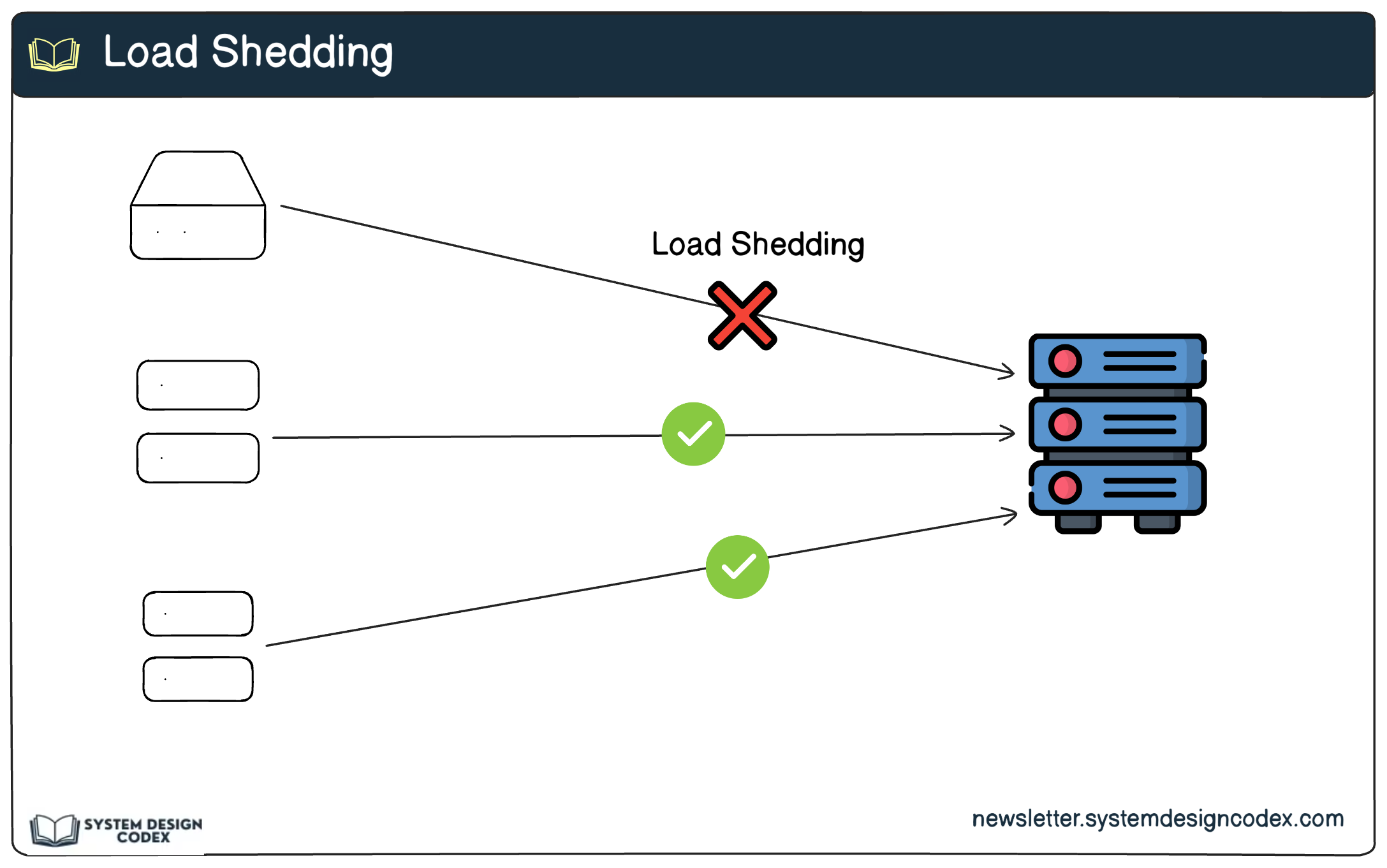
Why it matters. It prevents complete failure under peak load and lets you keep serving the requests that matter most.
Implementation tips.
- Use rate-control algorithms like token bucket or leaky bucket to decide how many requests to admit.
- Use priority queues so that critical work (e.g. payment transactions) is preserved while lower-priority traffic is dropped first.
- Combine with graceful degradation — under heavy load, turn off non-essential features (e.g. analytics, recommendations) so the core path stays alive.
2. Rate Limiting
Rate limiting caps how many requests a single client (user, API key, IP) can make in a given time window. While load shedding reacts to overall server stress, rate limiting protects you from any individual caller misbehaving.
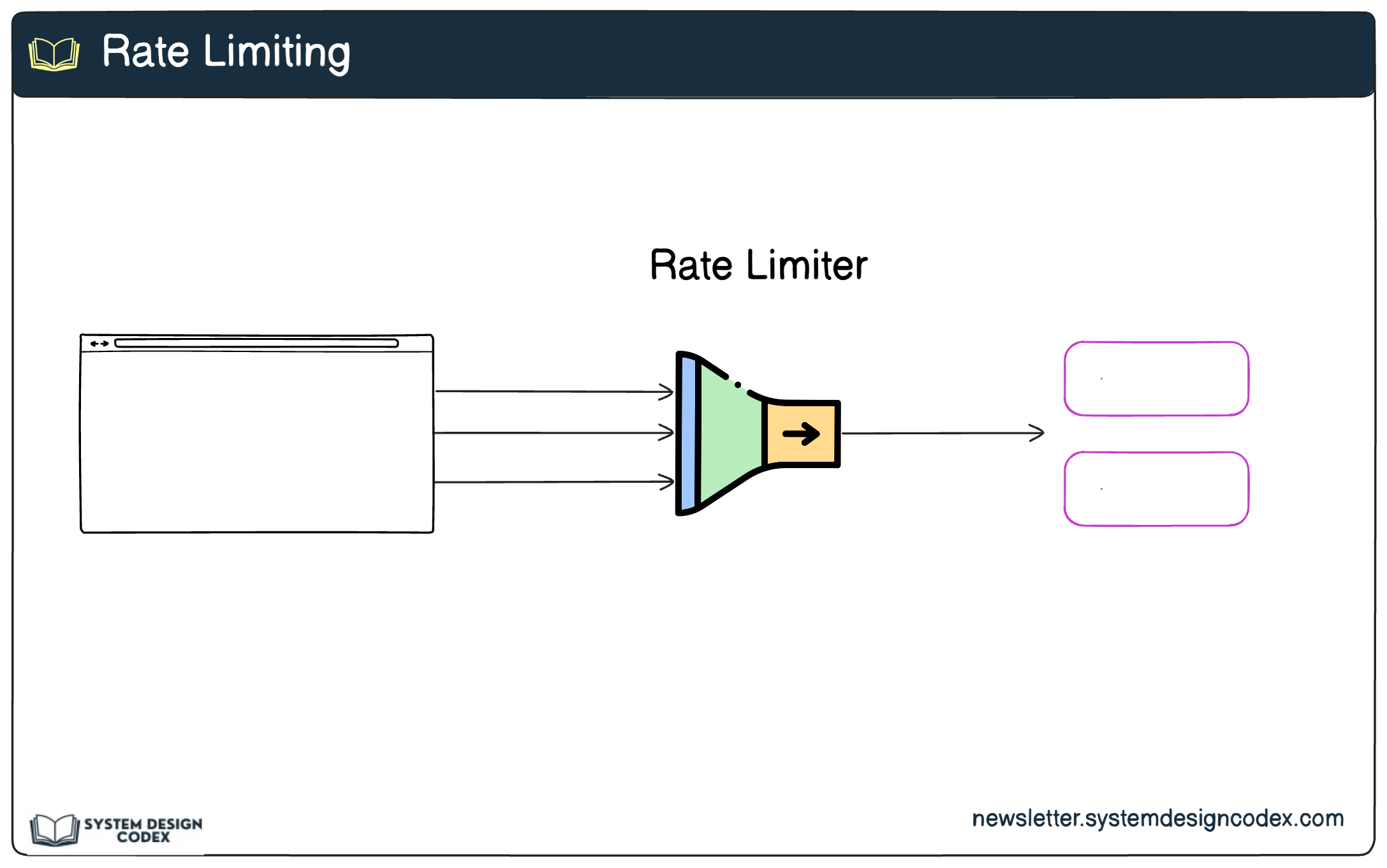
Why it matters. It defends against abuse — including DDoS attacks and runaway client bugs — and ensures fair resource sharing across all customers, so one noisy tenant doesn't degrade everyone else.
Implementation tips.
- Pick an algorithm that matches your needs: fixed window (simple, can have burst edges), sliding window (smoother), or token bucket (allows bursts up to a cap).
- Implement at the edge using an API gateway, NGINX, or a tool like Kong rather than inside every service.
- Return informative error responses — typically
HTTP 429 Too Many Requestswith aRetry-Afterhint — so well-behaved clients can back off correctly.
3. Bulkheads
The name comes from shipbuilding: a ship's hull is divided into watertight compartments (bulkheads) so that if one compartment is breached, the others stay dry and the ship stays afloat. In software, bulkheads mean isolating components so a failure in one doesn't drain resources from the rest.

Why it matters. It limits the blast radius of a failure. If your reporting subsystem starts hanging, it shouldn't be able to consume every database connection or every worker thread and take checkout down with it.
Implementation tips.
- Use separate resource pools per dependency or per workload — distinct thread pools, connection pools, or queues for high-priority vs. low-priority traffic.
- Reserve resources for critical paths so non-critical features can never starve them (e.g. a dedicated DB connection pool for payments).
- At the infrastructure level, use orchestrators like Kubernetes to allocate dedicated CPU/memory and isolate services into their own pods or namespaces.
4. Health Checks with Load Balancers
A load balancer should only send traffic to instances that can actually serve it. Health checks are the signal that tells the load balancer which instances are healthy and which to skip.

Why it matters. Without health checks, a load balancer happily forwards user traffic to dead or degraded instances, manifesting as random errors and timeouts even when most of the fleet is fine. Good health checks turn instance-level failures into invisible-to-users events.
Implementation tips.
- Use active health checks (the load balancer periodically pings a
/healthendpoint) and/or passive checks (the load balancer watches real request error rates and latency). - Configure thresholds carefully — e.g. mark an instance unhealthy after N consecutive failures or a sustained latency spike — to avoid flapping between states.
- During deploys, use rolling updates gated on health checks so new versions only take traffic once they pass, giving you zero-downtime releases.
Wrapping Up
The seven patterns work together as a layered defense:
- Timeouts, circuit breakers, and retries with backoff stop a failing dependency from poisoning the caller.
- Load shedding, rate limiting, bulkheads, and health checks stop a service from being overwhelmed and keep failures contained.
Adopting them isn't about chasing 100% uptime — it's about ensuring that when something does break, the impact is small, scoped, and recoverable. Pick the patterns whose failure modes you actually care about, tune them with real production metrics, and treat the configuration (timeouts, thresholds, backoff curves) as living numbers that evolve with your system.
Author
Saurabh Dashora
Continued reading
Keep your momentum

The AI Corner
The AI Agent That Thinks Like Jensen Huang, Elon Musk, and Dario Amodei
Dominguez opens with a claim that is easy to skim past but worth stopping on: the difference between elite founders and everyone else is not raw IQ or speed — it is that each of them has internalized a repeatable mental procedure they run on every important decision. The procedur
Apr 27 · 6m
Lenny's Newsletter (Lenny's Podcast)
Why Half of Product Managers Are in Trouble — Nikhyl Singhal on the AI Reinvention Threshold
Nikhyl Singhal is a serial founder and a former senior product executive at Meta, Google, and Credit Karma . Today he runs The Skip ( skip.show (https://skip.show)), a community for senior product leaders, plus offshoots like Skip Community , Skip Coach , and Skip.help . Lenny de
Apr 27 · 7m

Simon Willison's Newsletter
Qwen3.6‑35B‑A3B on my laptop drew me a better pelican than Claude Opus 4.7
Two big model releases dropped on the same morning: Qwen3.6‑35B‑A3B from Alibaba (an open‑weights model) and Claude Opus 4.7 from Anthropic (a closed, frontier proprietary model). Simon ran his long‑running joke benchmark — "Generate an SVG of a pelican riding a bicycle" — on bot
Apr 27 · 11m