ByteByteGo Newsletter
How DoorDash Launches a New Country in One Week
ByteByteGo
Apr 21, 2026
How DoorDash Launches a New Country in One Week
Source: ByteByteGo Newsletter · Author: ByteByteGo · Date: 2026-04-21 · Original article
The headline result
When DoorDash launched Dasher (driver) onboarding in Puerto Rico, the whole thing shipped in about a week. The reason wasn't a heroic effort or corner-cutting — it was that almost no new code was needed. The pieces a Puerto Rican Dasher had to go through (identity checks, data collection, compliance validation) already existed as independent modules, battle-tested by thousands of Dashers in other countries. The team just assembled them into a new workflow, made one minor customization, and shipped.
This wasn't a one-off either:
- Australia: under a month
- Canada: two weeks
- New Zealand: almost no new development
That speed came from a deliberate architectural rebuild — a decision the team made when their growing pile of country-specific if/else statements got too painful to keep patching. They redesigned onboarding around a simple idea: decompose the process into self-contained modules with standardized interfaces, then connect them through a deliberately simple orchestration layer.
The cost of country-specific logic (the legacy mess)
DoorDash's onboarding started simple — a few steps for a single country and straightforward code. Then they expanded internationally, and every new market added new branches. The system rotted in four specific ways:
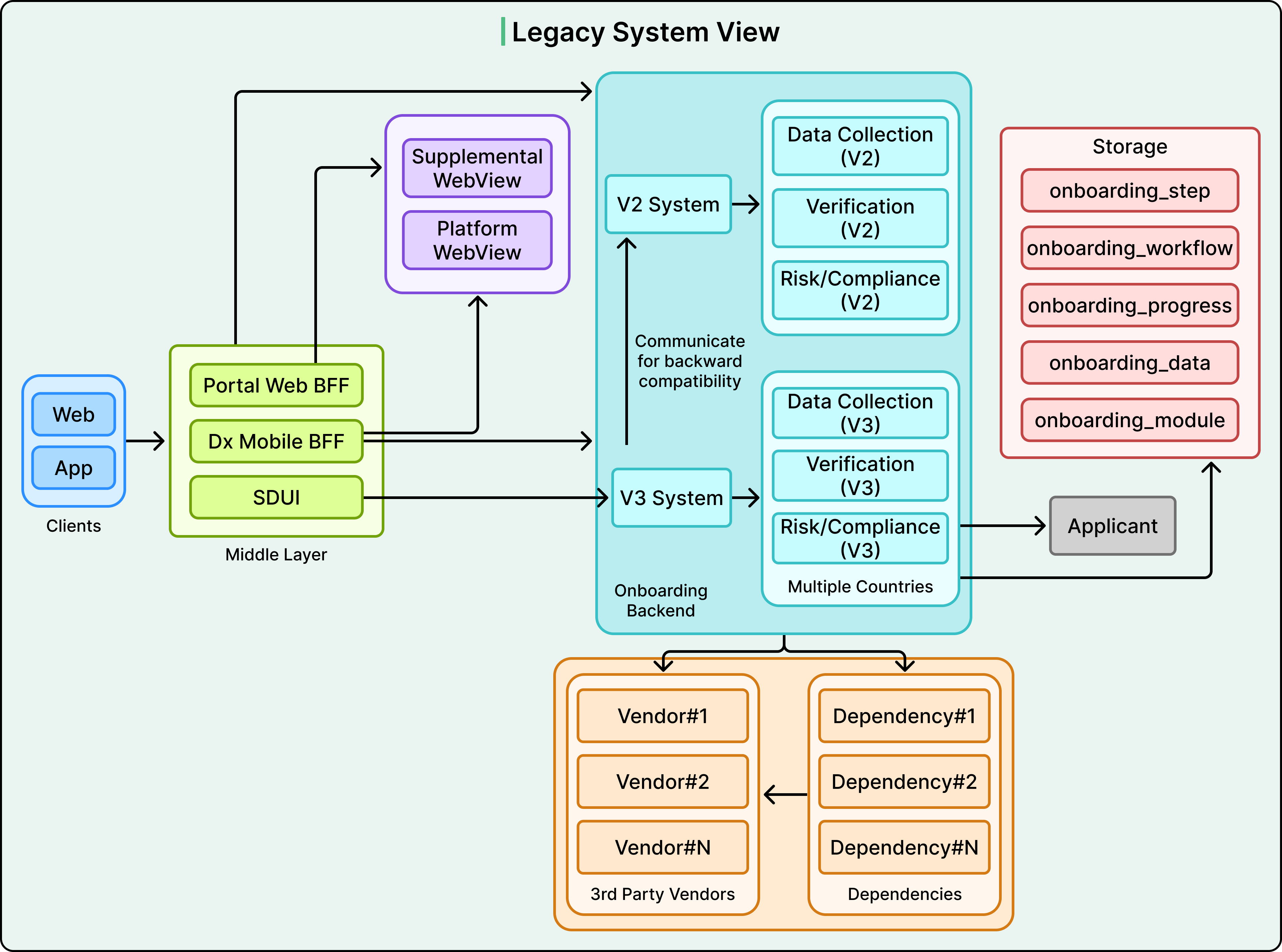
1. API version archaeology. At one point three API versions coexisted. V3 (the newest) still called V2 handlers for backward compatibility and still wrote to V2 database tables. The system literally could not escape its own history. Nobody could fully explain which version handled what, and removing any piece felt dangerous because something else might depend on it. (Most engineers have seen this movie before.)
2. Hard-coded sequences with country branches everywhere. Step sequences themselves were hard-coded. Business logic started branching the moment a request came in — deep if/else chains keyed on country, step type, or prior state. Adding a new market meant carefully threading new conditions through this maze without breaking the existing ones.
3. Inconsistent vendor integration patterns. Some onboarding steps called internal services that called third-party vendors. Other steps called vendors directly. There was no single rule, which made testing and debugging unpredictable.
4. State scattered across many tables. Onboarding progress was tracked across multiple separate database tables — flags like validation_complete = true or documents_uploaded = false lived in different systems. If a user dropped off mid-onboarding and came back, figuring out where they actually stood meant querying several systems and inferring the truth. This was a frequent source of bugs.
The practical cost: launching a new country took months of engineering effort across APIs, tables, and code branches, and every change risked breaking a market on the other side of the world.
The new architecture: orchestrators, workflows, and steps
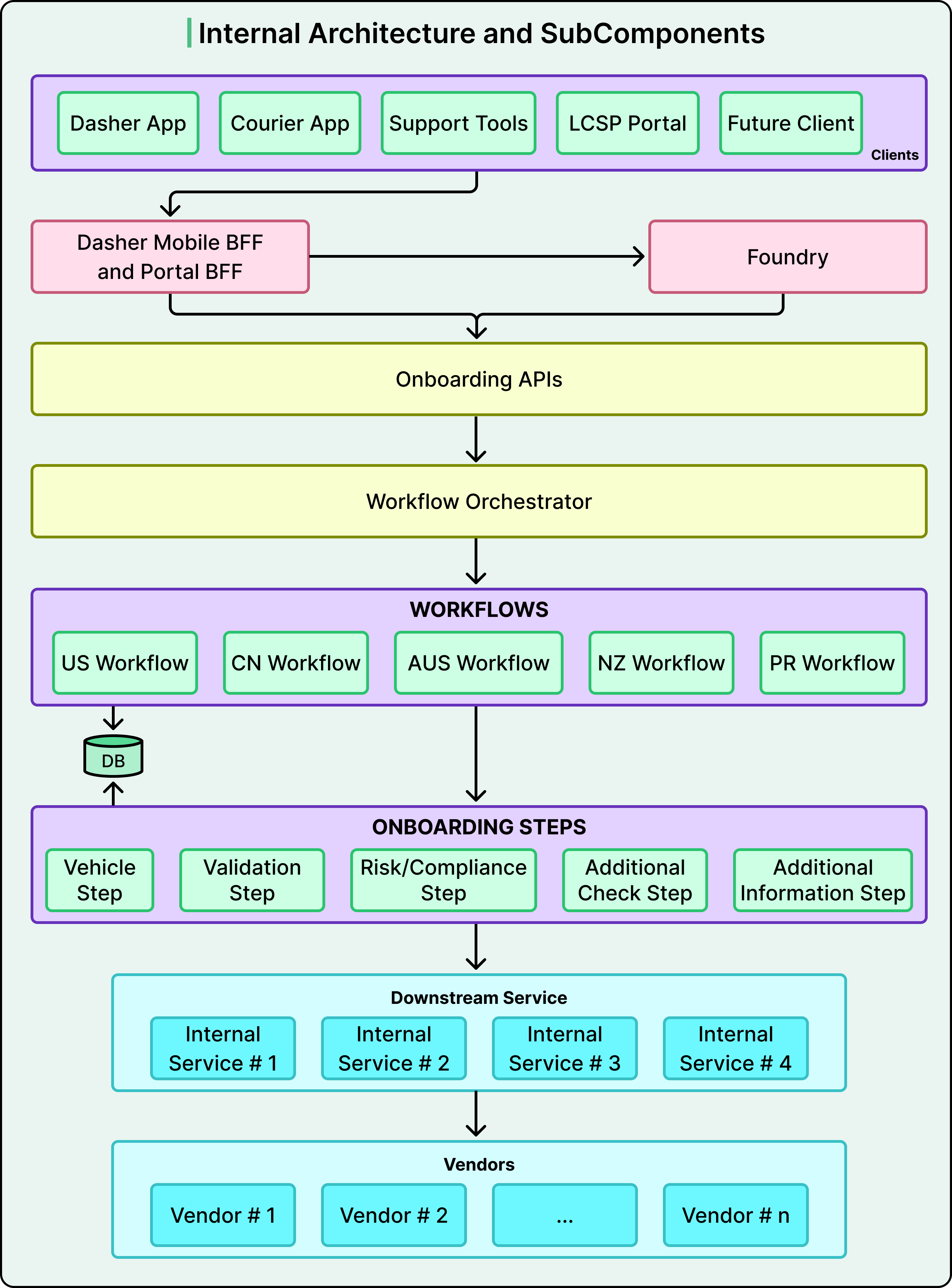
The rebuild is organized around three distinct layers, each with one responsibility. The separation between them is where the power lives.
Layer 1 — The Orchestrator (the "traffic cop")
The Orchestrator sits at the top. It's a lightweight routing layer: it looks at context (which country, which market type) and decides which workflow definition should handle the request. That's all. It doesn't execute steps. It doesn't manage state. It contains no business logic.
The key insight — and the most counterintuitive part — is that the smartest thing about the orchestrator is how little it does. Engineers tend to imagine the central controller as the "brain" of the system, and naturally over-build it into a god object. Here, the brain is distributed across the step modules; the orchestrator is just a traffic cop pointing requests at the right workflow.
Layer 2 — Workflow Definitions (the "Lego instructions")
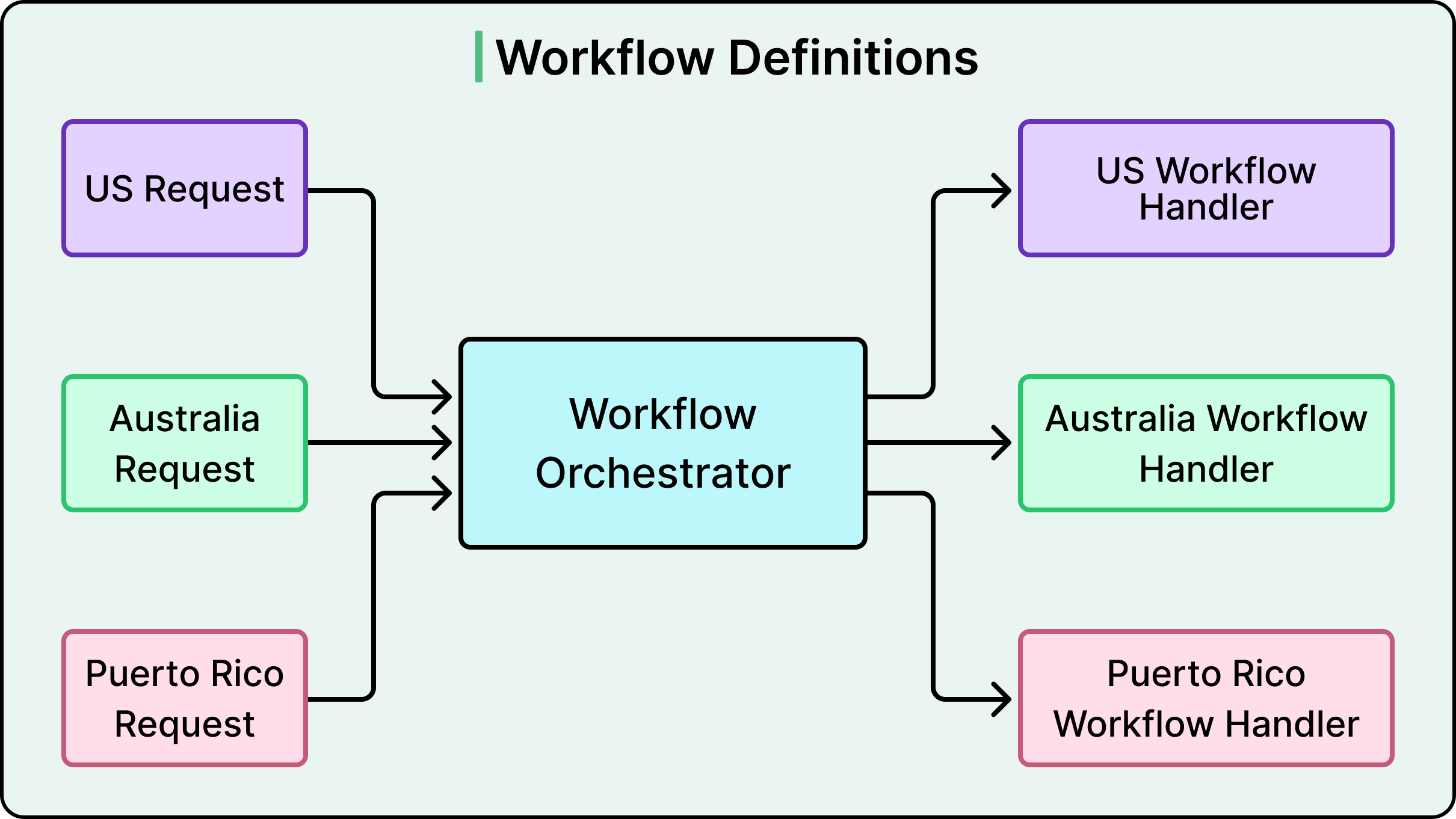
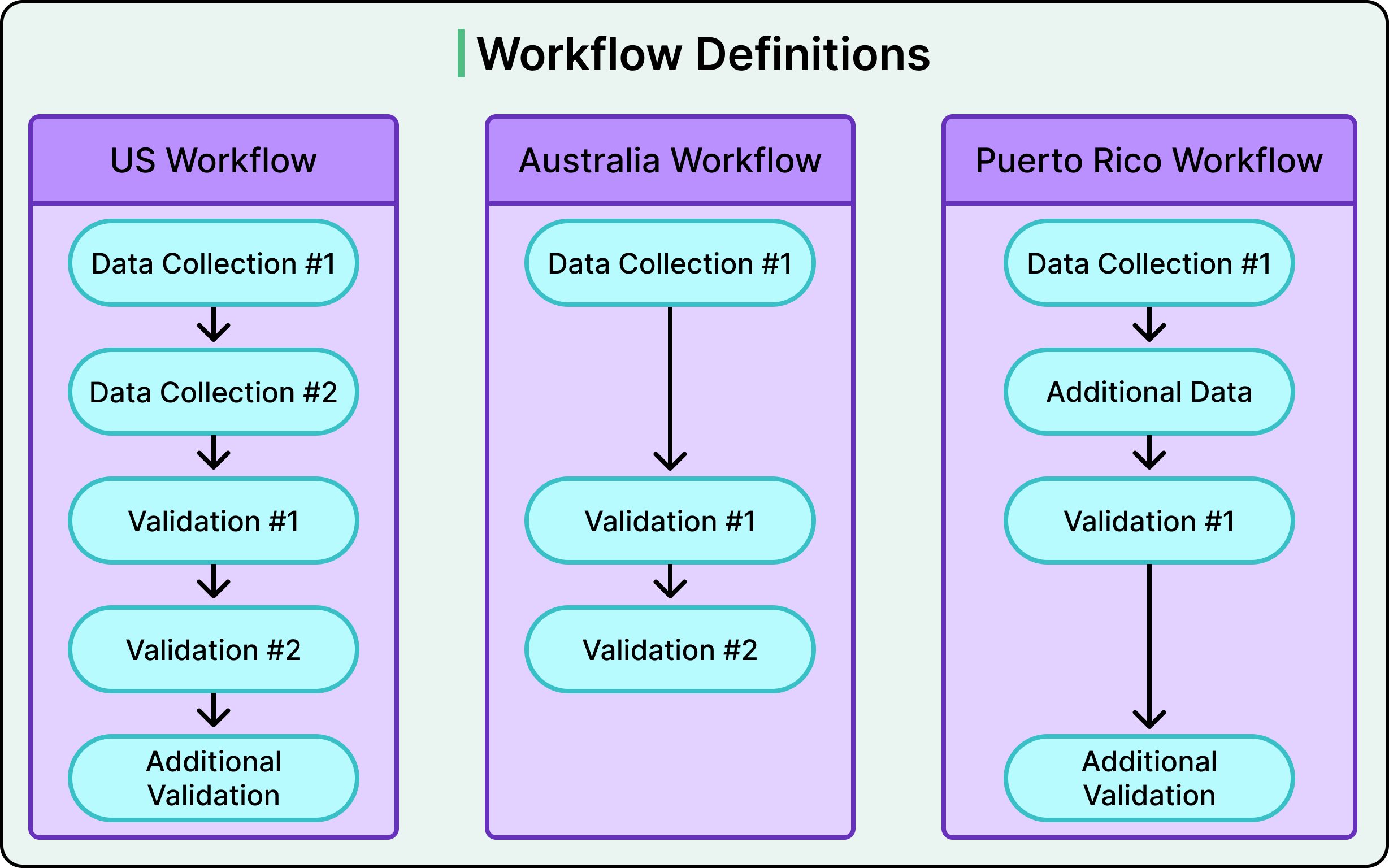
A workflow is simply an ordered list of step references for a specific market. Each workflow is defined as a class, so you can read the file and immediately see exactly what that market's onboarding looks like. Examples:
- US: Data Collection → Identity Verification → Compliance Check → Additional Validation
- Australia: skips one step, reorders another
- Puerto Rico: adds a regional customization
Think of it like a Lego set. Each brick has a standardized shape — studs on top, tubes on the bottom — and that standard interface lets you build anything. A workflow definition is the building instructions for one specific model. The bricks (steps) don't change; you just rearrange them.
Layer 3 — Step Modules (where the actual work happens)
Each step (data collection, identity verification, risk and compliance, document verification, etc.) is an independent, self-contained module. A step knows how to:
- collect its data
- validate it
- call its external vendors
- handle retries and failures
- report success or failure
What it deliberately doesn't know is which workflow it belongs to, or what comes before or after it. That ignorance is what makes a step reusable in any market.
The interface contract
The mechanism that makes plug-and-play work is a shared interface contract. Every step implements the same standardized interface:
- a method to process the step
- a method (
isStepCompleted()) to check if it's complete - a method to return its response data
As long as a new step honors this contract, it can slot into any workflow and the workflow doesn't know or care about its internals.
This contract also gives teams autonomy. The identity-verification step can be owned entirely by the security team. Payment setup can belong to finance. Each team iterates on its own step independently as long as the interface stays stable. The architecture mirrors the org chart — or, more accurately, lets the org chart work for the system instead of against it.
Two extra capabilities that make the system flexible
- Composite steps group several granular steps into one logical unit. One country might collect all personal information on a single screen; another might split it across three. A composite called
PersonalDetailscan wrapProfile,AdditionalInfo, andVehicletogether, handling that variation without changing the underlying steps. - Dynamic / conditional steps. A
Waitliststep might only appear in markets with specific supply conditions. The same step can even appear multiple times in the same workflow. This goes beyond reordering and confirms steps are truly stateless and workflow-agnostic.
Proof it actually works: the address step
The clearest evidence is the address-collection step. DoorDash built it once as a standalone module. Then:
- Australia needed address collection early in the flow (for compliance). The team just inserted the existing module before the compliance step in Australia's workflow definition — no special logic, no branching.
- Canada later adopted the same step for validation and service-area mapping. Worked out of the box.
- The US team experimented by enabling it in select regions. Again, no new code.
A useful clarification
The pattern (orchestrator → workflows → steps) generalizes to any multi-step process that varies across contexts: checkout flows, approval pipelines, content moderation queues. And importantly, DoorDash's step modules are not separate microservices — they're modules inside a single service. The lesson is about logical decomposition and interface design, not deployment boundaries. You can apply this same pattern inside a monolith.
One map for all onboarding state
Modular steps only work if there's a clean answer to: where is each applicant in their journey?
The legacy answer — progress scattered across many tables, requiring tight cross-service coordination — was the source of constant bugs and brittle integrations.
The new answer is the status map: a single JSON object in the database where every step writes its own progress. It looks roughly like:
{
  "personal_info": { "status": "DONE", "metadata": { "name": "Jane" } },
  "address":       { "status": "DONE", "metadata": { "address_id": "abc123" } },
  "validation":    { "status": "IN_PROGRESS" },
  "compliance":    { "status": "INIT" }
}
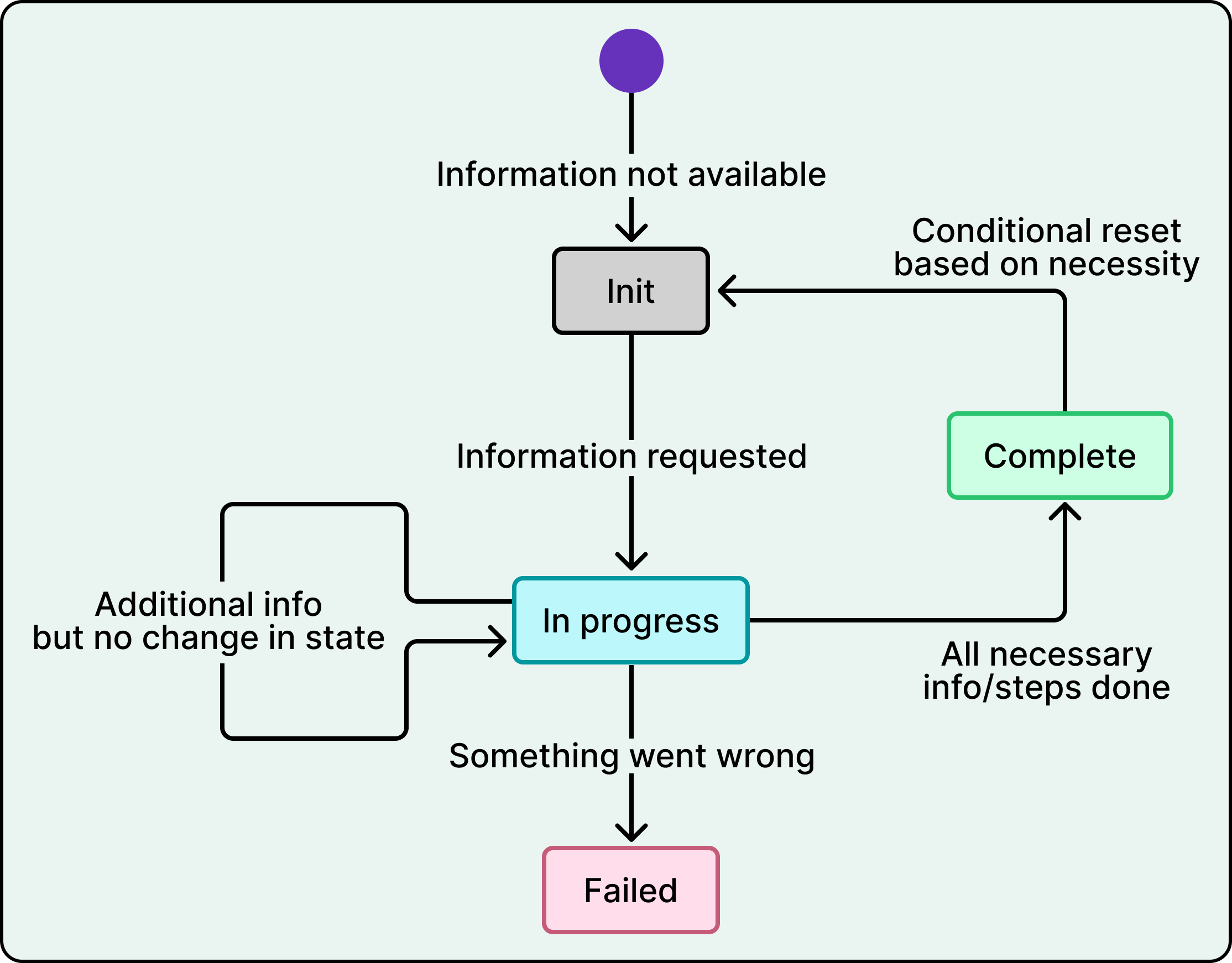
A few rules make this clean:
- Each step owns its own entry. When a step starts, completes, fails, or is skipped, it writes that transition directly to its key in the map.
- The workflow layer never writes to the status map. It only reads it. This keeps the orchestration layer stateless and simple.
isStepCompleted()lives on the step. Each step defines its own completion logic by reading the status map. One step might treatSKIPPEDas terminal; another might not. That flexibility lives at the step level, not the workflow level.- Atomic JSON key merges handle partial updates: when one step writes its entry, it doesn't overwrite the rest of the map.
The practical payoff: a single query on the status map tells you exactly where any applicant stands.
Migration: the half of the story that's actually hard
The architecture is only half the work. Replacing the engine while the plane is flying is the other half.
DoorDash didn't flip a switch. They designed the new platform to coexist with the existing V2 and V3 APIs, running old and new side by side. Applicants who were partway through the legacy flow had to keep going seamlessly, so the team built temporary synchronization mechanisms that mirrored progress between the old and new systems until migration was done. That sync layer was deliberately built to be thrown away — intentional, temporary technical debt.
Other large initiatives were happening at the same time, sometimes conflicting with the new design. Instead of treating them as blockers, the team collaborated and adapted the architecture where needed.
The migration started with the US in January 2025 — the largest, most complex market — as the proving ground. After that, the compounding payoff kicked in:
- Australia: under a month, only two localized steps needed
- Canada: two weeks, one new module
- Puerto Rico: one week, a minor customization
- New Zealand: almost no new development
Every migration launched with zero regressions, no user-facing incidents, no onboarding downtime, and no unexpected drop in completion rates. Each rollout got faster because more modules had already been battle-tested elsewhere.
The architecture has paid off beyond just adding countries: DoorDash is integrating its onboarding with another large, independently developed ecosystem that has its own mature flow. The modular design let them build integration-specific workflows while reusing most existing logic — something that would have been brutal in the legacy system.
The tradeoffs (the honest part)
Modularity isn't free.
- Coordination overhead. For a single-market startup, this architecture is overkill. A monolithic onboarding flow is fine until you hit the inflection point where country-specific branching costs more than decomposition.
- Reuse only works when the underlying concept generalizes. Addresses are conceptually similar everywhere, which is why the address step was reused so cleanly. But compliance requirements can be fundamentally different between regulatory regimes — those won't reuse as easily.
- Platform-vs-domain boundaries need ongoing negotiation. DoorDash addresses this with published platform principles, versioned interface contracts, and joint KPIs that create shared accountability. Domain teams own their business logic (fraud, compliance, payments); the platform enforces consistency. This is a human-coordination problem that architecture alone doesn't solve.
What's next
The roadmap includes:
- Dynamic configuration loading — workflows go live through config rather than code.
- Step versioning — multiple iterations of a step can coexist during experiments or rollouts.
- Operational tooling so non-engineering teams can manage workflows directly.
DoorDash deliberately kept workflows code-defined for now rather than jumping straight to config-driven. Config-driven systems are powerful but bring their own complexity — they can be harder to debug and harder to test.
The takeaway pattern
What DoorDash built generalizes. For any system that supports multiple variants of a multi-step process, the recipe is:
- A thin orchestrator that only routes — no business logic, no state.
- Composable workflows defined as ordered lists of step references.
- Self-contained steps behind a standardized interface, ignorant of the workflow they live in.
- A single shared state structure (a status map) where each step owns its own entry and the workflow only reads.
The most counterintuitive lesson, echoed in the comments: resist the urge to build the central router into a "brain." Distributing the brain into the step modules is what unlocks team autonomy and the kind of one-week country launches DoorDash now ships.
Reference: Unified Dasher Onboarding: A Modular Platform to Scale Globally — DoorDash Engineering
Author
ByteByteGo
Continued reading
Keep your momentum
MKT1 Newsletter
100 B2B Startups, 100+ Stats, and 14 Graphs on Web, Social, and Content
This is Part 2 of MKT1's three-part State of B2B Marketing Report. Where Part 1 looked at teams and leadership , Part 2 turns to what marketing teams are actually doing — what their websites look like, how they use social, and what "content fuel" they're producing. Emily Kramer u
Apr 28 · 10m
Lenny's Newsletter (Lenny's Podcast)
Why Half of Product Managers Are in Trouble — Nikhyl Singhal on the AI Reinvention Threshold
Nikhyl Singhal is a serial founder and a former senior product executive at Meta, Google, and Credit Karma . Today he runs The Skip ( skip.show (https://skip.show)), a community for senior product leaders, plus offshoots like Skip Community , Skip Coach , and Skip.help . Lenny de
Apr 27 · 7m

The AI Corner
The AI Agent That Thinks Like Jensen Huang, Elon Musk, and Dario Amodei
Dominguez opens with a claim that is easy to skim past but worth stopping on: the difference between elite founders and everyone else is not raw IQ or speed — it is that each of them has internalized a repeatable mental procedure they run on every important decision. The procedur
Apr 27 · 6m