The Product Compass
Claude Cowork Now Runs Any LLM. Test It Free.
Paweł Huryn
Apr 23, 2026
Claude Cowork Now Runs Any LLM. Test It Free.
Source: The Product Compass · Author: Paweł Huryn · Date: Apr 23, 2026 · Original article
TL;DR
Anthropic quietly shipped a feature called Cowork on 3P (third-party inference) inside Claude Desktop. It lets you keep using the Claude Cowork and Claude Code environment — the agent harness with skills, plugins, MCP servers, and sub-agents — but swap the model behind it for anything: GPT-5, Grok, Gemini, open-weight models like Gemma or Kimi K2 via OpenRouter, a local model on your laptop, or your enterprise gateway (Amazon Bedrock, Google Vertex AI, Azure AI Foundry). No press release, no blog post — Paweł found it in the docs by accident, and OpenRouter's CEO confirmed it works.
The headline: you can run the full Cowork experience for free using a free OpenRouter model — no $100/$200 Max subscription required.
What "Cowork on 3P" Actually Is
A useful mental model: think of Claude Desktop as a car. The harness (Cowork, Code tab, skills, plugins, MCP, sub-agents, sandbox) is the chassis, dashboard, and seats. The LLM is the engine. Until now you had to use Anthropic's engine (Claude). With Cowork on 3P, the engine bay is now standard — drop in any compatible engine you want.
It's currently a research preview. Anthropic's docs officially target three audiences:
- Regulated industries (banks, healthcare, government) that can't legally send data to Anthropic directly.
- Companies that already route Claude through their own LLM gateway.
- Individuals on pilot/evaluation setups.
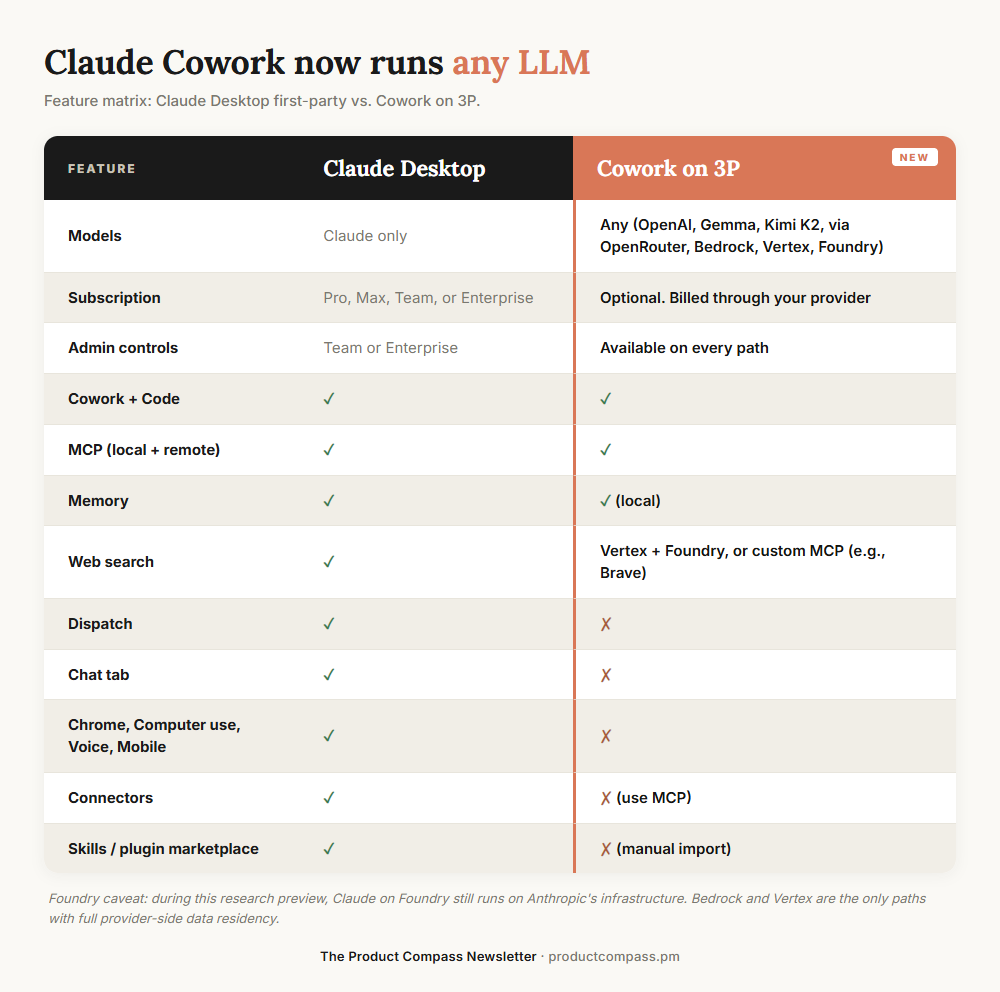
Every admin control ships on all three paths: per-user token caps, MCP allowlist, OpenTelemetry endpoint, blocking auto-updates, removing built-in tools.
OpenRouter as a gateway. OpenRouter isn't listed in Anthropic's docs, but Paweł tested it and OpenRouter's CEO Alex Atallah publicly confirmed support. That's the loophole that turns this into a free-tier story for individuals.
A nuance on Foundry: during the preview, Claude on Azure Foundry still runs on Anthropic's infrastructure. Only Bedrock and Vertex give true provider-side data residency today.
Who Should Care
Individuals — three concrete scenarios:
- You keep hitting the Max plan's weekly usage limits and want headroom.
- You'd like to try Cowork without committing to $100–$200/month.
- You're working with code or data you can't legally send to any hosted API, so you need a local model.
Enterprises — different angle, same plumbing:
- You're already on Bedrock, Vertex, or Foundry and want the Claude harness inside your existing compliance boundary.
- Your security team approves your cloud provider but not Anthropic direct.
- You need team-wide admin controls (token caps, MCP allowlist, OpenTelemetry).
How to Set It Up
1. Connect Claude Desktop to OpenRouter
No proxy needed — point Claude Desktop straight at OpenRouter.
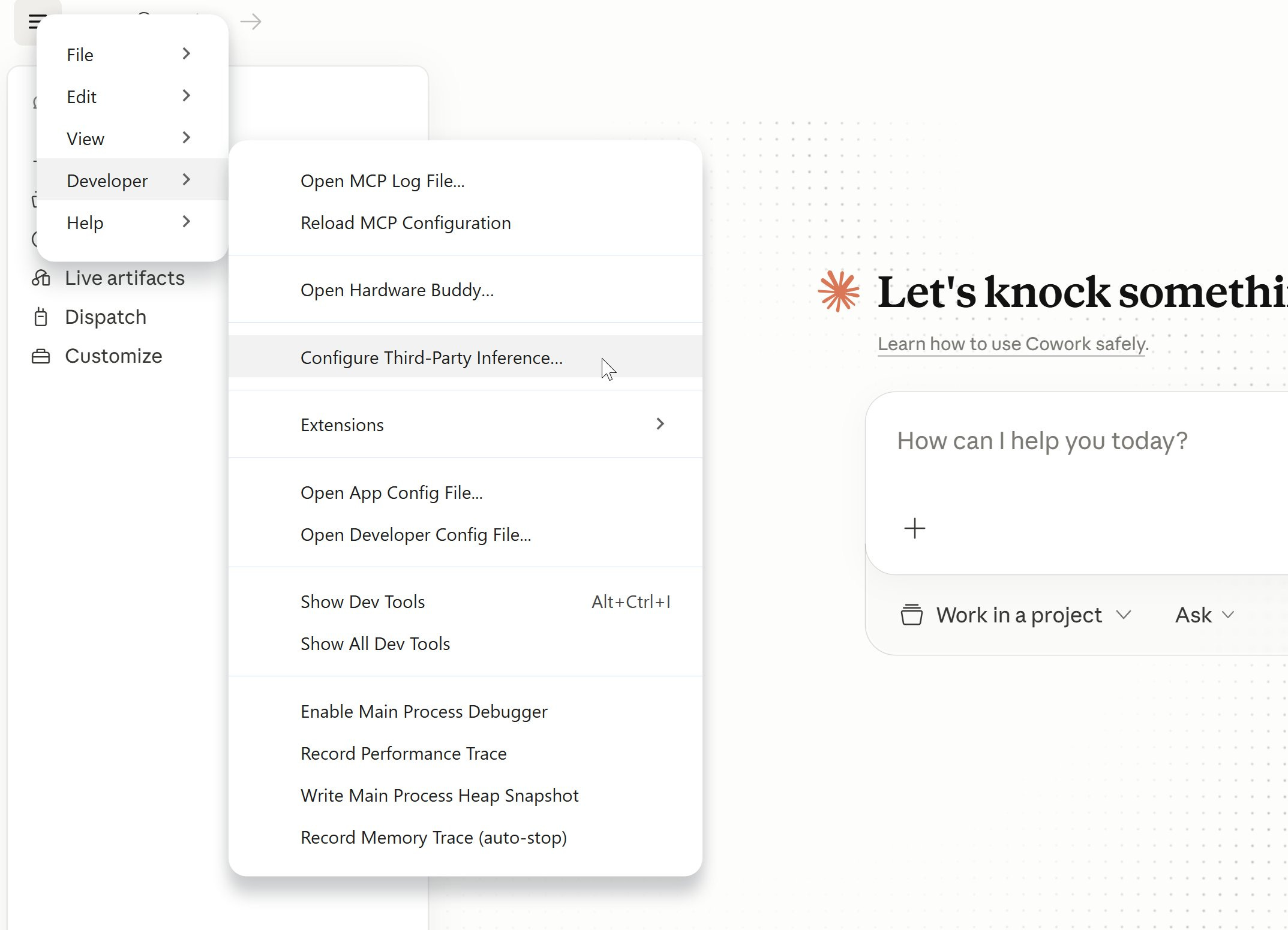
- Menu → Developer → Configure Third-Party Inference.
- Set the fields:
- Connection: Gateway
- Gateway base URL:
https://openrouter.ai/api - Gateway API key: your OpenRouter key
- Gateway auth scheme:
x-api-key
- Under Sandbox & workspace, configure "Allowed egress hosts" so the agent can reach the web (use
*for all sites if you trust it). - Click Apply locally → Relaunch now.
- Log out, then choose Continue with Gateway.
- You'll see "Setting up Claude's workspace…" and you can start chatting.
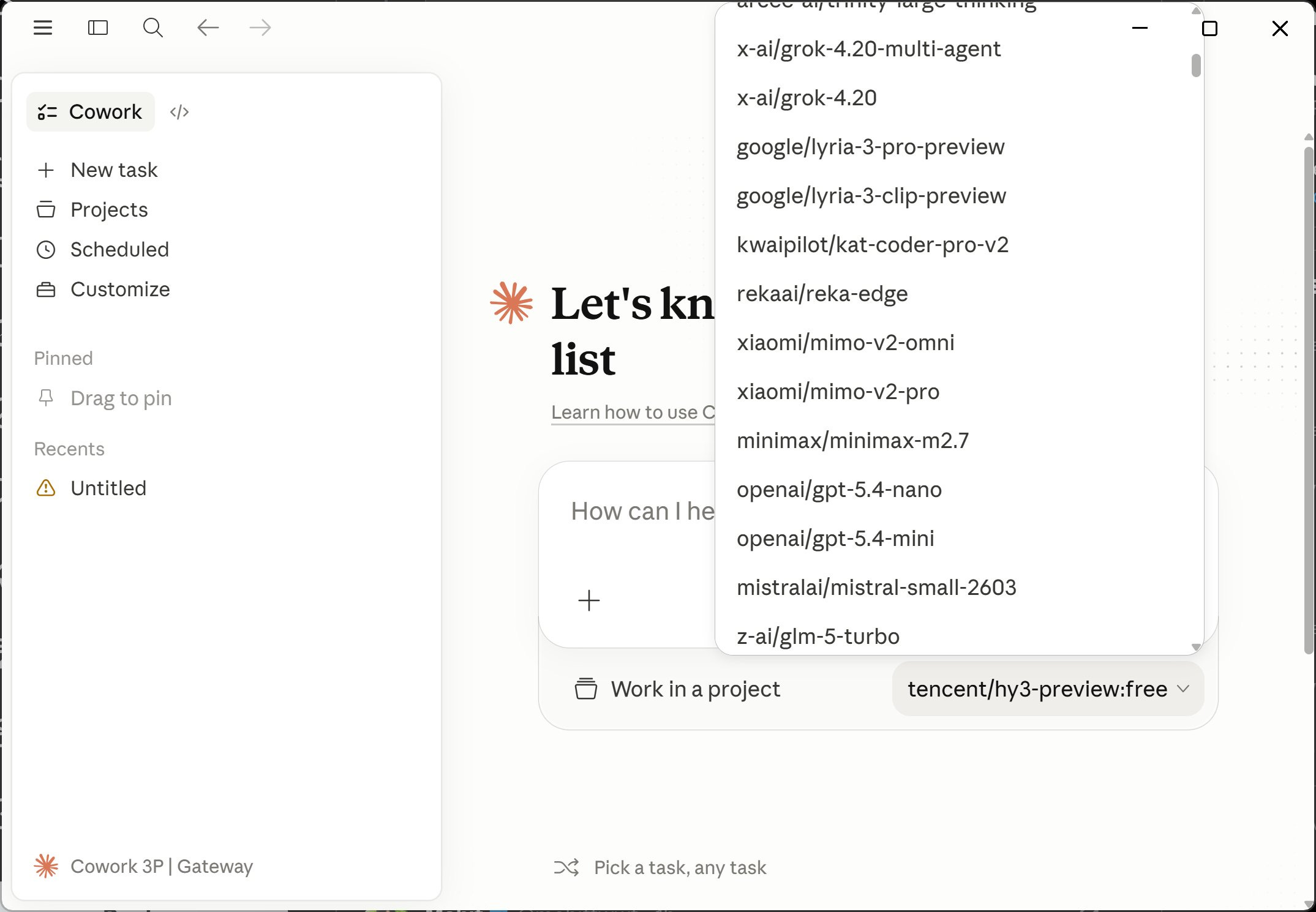
A free OpenRouter model that worked for Paweł: tencent/hy3-preview:free.
Local models work the same way through any OpenAI-compatible proxy — LiteLLM in front of Ollama, or Ollama's own OpenAI endpoint. That makes "fully offline Cowork" possible.
2. Import Anthropic Skills (manually)
When you're on OpenRouter, the Customize → Skills panel ships empty. The official skills (docx, pdf, pptx, xlsx, skill-creator) need to be installed by hand:
- Download the anthropics/skills repo as a
.zip. - Extract
skills-main.zipand open the folder. - Zip each skill subfolder individually (e.g., the
docxfolder →docx.zip). - In Claude Desktop: Customize → Skills → Create skill → Upload a skill, and upload each
.zip.
Only import skills you actually need — every loaded skill consumes context window space even when idle.
3. Import Anthropic Plugins
Same pattern, two source repos:
- Knowledge-work plugins (marketing, product-management, legal, finance): anthropics/knowledge-work-plugins
- Code-tab plugins: anthropics/claude-plugins-official
Download → extract → zip the plugin folder you want → Customize → Personal plugins → + → Create plugin → Upload plugin. Cap it at 2–3 plugins; very often 0 is the right answer.
4. Configure MCP Servers
MCP (Model Context Protocol) servers run locally — they're how the agent gets tools like Jira, Confluence, GitHub, file access, etc. Add them under Settings → Developer, which writes to a dedicated claude_desktop_config.json. The official server catalog lives at github.com/modelcontextprotocol/servers.
Example: Atlassian (Jira + Confluence) via the community mcp-atlassian server:
{
  "mcpServers": {
    "atlassian": {
      "command": "uvx",
      "args": ["mcp-atlassian"],
      "env": {
        "JIRA_URL": "https://your-domain.atlassian.net",
        "JIRA_USERNAME": "your-email@example.com",
        "JIRA_API_TOKEN": "your_api_token"
      }
    }
  }
}
5. Web Search — the one real gap
OpenRouter does not support Anthropic's native web search tool. Three workarounds:
- Replace with an MCP. Add
WebSearchtodisabledBuiltinTools(so the agent doesn't get confused calling a dead tool) and install the Brave Search MCP server. Brave gives 2,000 free requests/month, then $3 per 1,000.{ "mcpServers": { "brave-search": { "command": "npx", "args": ["-y", "@modelcontextprotocol/server-brave-search"], "env": { "BRAVE_API_KEY": "YOUR_API_KEY_HERE" } } } } - Switch provider to Vertex AI or Microsoft Foundry — both support native web search. Bedrock does not yet.
- Wait. OpenRouter could route the
web_searchtool to Perplexity or similar, but that hasn't shipped.
Troubleshooting
- "Configure Third-Party Inference" missing under Menu → Developer: update Claude Desktop, restart, then enable developer mode via Help → Troubleshooting → Enable Developer Mode. Some users on corporate/Team plans have reported it's still missing — likely plan-gated or A/B rolled.
- "Local MCP servers" missing in Cowork on 3P: same fix — update + developer mode.
- Connectors show as "Unavailable": not a bug. Connectors depend on Anthropic's hosted infrastructure layer; once you go third-party, that layer is bypassed. Replace each connector with an equivalent MCP server.
- Tool calling is flaky on non-Claude models: this is real and model-dependent. Some models handle MCP calls cleanly; others fall apart on multi-step agentic flows. Best results so far come from Anthropic's own pay-per-token API models — ironic, but expected.
- Code tab settings don't match Cowork settings: Anthropic acknowledges some Cowork-on-3P config keys don't propagate identically to Code-tab sessions yet.
What This Signals (the strategic read)
Look at the controls Anthropic exposed in the Third-Party Inference panel:
- Max tokens per window (per-user soft cap)
- Allow user-added MCP servers
- OpenTelemetry collector endpoint
- Block auto-updates
- Remove built-in tools from Cowork
None of these matter to a solo user. They are admin controls. Combined with Bedrock / Vertex / Foundry support, Anthropic's framing in the docs is explicit:
Cowork on 3P is designed for organizations whose security, regulatory, or contractual requirements prevent them from sending data to Anthropic's first-party infrastructure.
The strategic implication: Claude Desktop is becoming a managed agent platform. The harness — Code, Cowork, skills, plugins, MCP, sub-agents — is what Anthropic actually wants to be the default, regardless of which model sits behind it. The model becomes commodity; the harness becomes the moat.
For individuals, the path is documented but not advertised. On a personal install with no administrator, the install instructions tell you to "enter the values supplied by your administrator" — but if there is no administrator, those fields are simply yours to fill in. That's the open door.
Bottom Line
Download Claude Desktop, point it at OpenRouter with a free model, install the skills and plugins you actually need, and you have a fully working agentic IDE — same harness as the $200/month plan — for $0. For enterprises, the same flip puts the harness inside Bedrock/Vertex/Foundry without sending data to Anthropic.
Reference docs:
Author
Paweł Huryn
Continued reading
Keep your momentum
MKT1 Newsletter
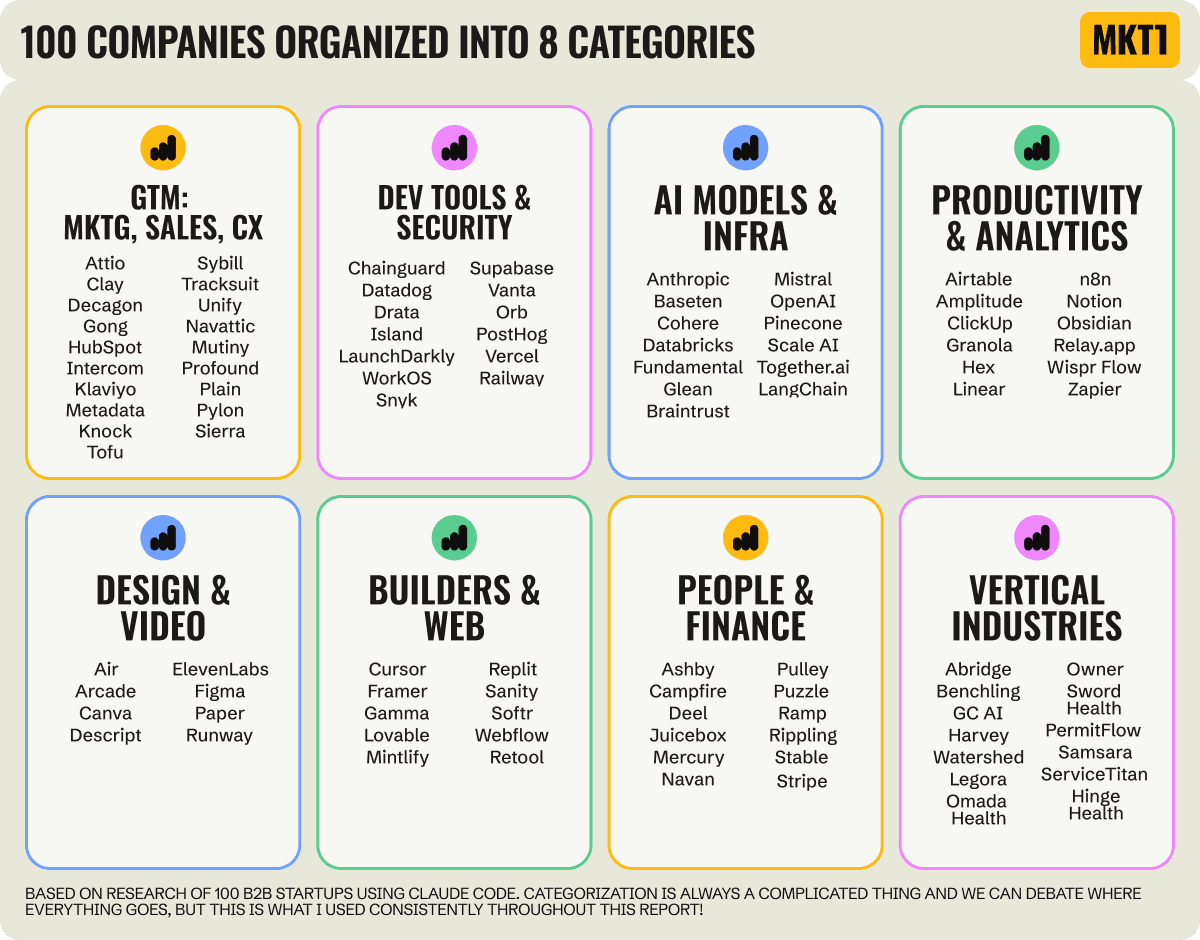
100 B2B Startups, 100+ Stats, and 14 Graphs on Web, Social, and Content
This is Part 2 of MKT1's three-part State of B2B Marketing Report. Where Part 1 looked at teams and leadership , Part 2 turns to what marketing teams are actually doing — what their websites look like, how they use social, and what "content fuel" they're producing. Emily Kramer u
Apr 28 · 10m
Lenny's Newsletter (Lenny's Podcast)
Why Half of Product Managers Are in Trouble — Nikhyl Singhal on the AI Reinvention Threshold
Nikhyl Singhal is a serial founder and a former senior product executive at Meta, Google, and Credit Karma . Today he runs The Skip ( skip.show (https://skip.show)), a community for senior product leaders, plus offshoots like Skip Community , Skip Coach , and Skip.help . Lenny de
Apr 27 · 7m

The AI Corner
The AI Agent That Thinks Like Jensen Huang, Elon Musk, and Dario Amodei
Dominguez opens with a claim that is easy to skim past but worth stopping on: the difference between elite founders and everyone else is not raw IQ or speed — it is that each of them has internalized a repeatable mental procedure they run on every important decision. The procedur
Apr 27 · 6m