System Design One
9 Agentic Patterns, Simply Explained
Neo Kim
Apr 22, 2026
9 Agentic Patterns, Simply Explained
Source: System Design One · Author: Neo Kim · Date: 2026-04-22 · Original post
Note: This newsletter is partially paywalled. The summary below covers the freely accessible portion: the framing, the escalation ladder, all four workflow patterns, and the opening of the agent-patterns section (Reflection). Patterns 6–9 (Tool Use, ReAct, Planning, Evaluator-Optimizer) and the AI code review case study are behind the paywall and not summarized here.
The big idea: how much control do you hand to the model?
When you build software with Large Language Models (LLMs — the AI models behind ChatGPT, Claude, etc.), there's one decision that quietly shapes everything else:
Does your code run every step, or does the model figure out the steps on its own?
That spectrum is what "agentic patterns" are about. They're not a new field — they're the same architecture questions you'd ask in any system: who controls what happens next, what happens on failure, and how data flows between components. The twist is that some of those components are now language models, which are non-deterministic and can decide things for themselves.
On one end of the spectrum sit workflow patterns, where your code is in charge and the LLM just fills in the blanks at each step. On the other end sit agent patterns, where the LLM decides what to do next and your code only sets the boundaries. Picking a pattern is really picking a point on that control dial.
Step 0: Not everything needs an agent
The most common mistake is reaching for an agent (or even a workflow) too early. Neo's rule: start with the simplest setup that works, and only escalate when it actually breaks.
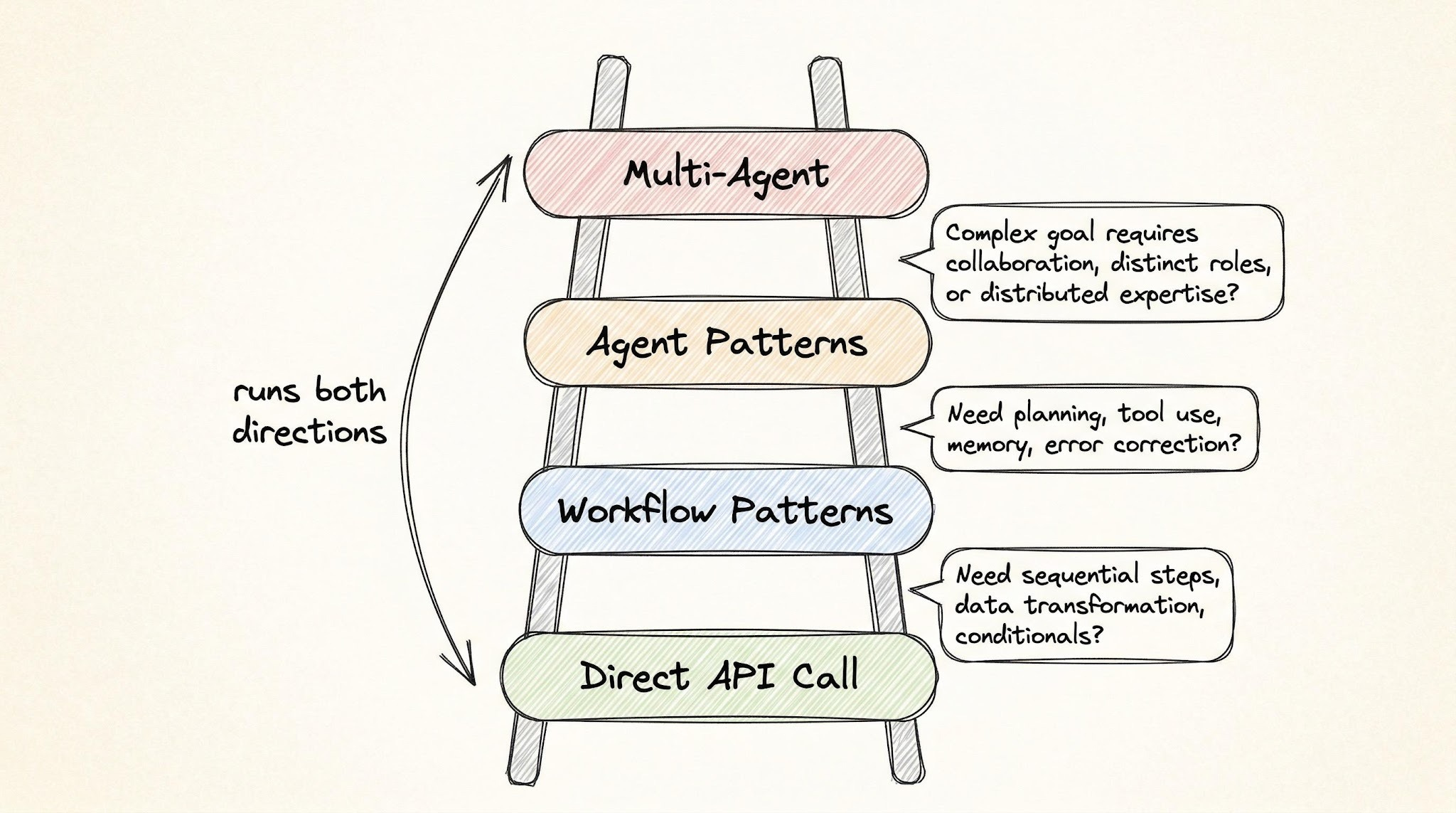
The escalation ladder has four rungs:
Rung 1 — A single LLM API call
A plain prompt can do far more than people give it credit for:
- Summarization
- Classification
- Extraction (e.g. pulling fields out of free text)
- Rewriting
- Translation
- Code generation, when the spec is clear
Most engineers blow past this rung too quickly and over-architect.
Rung 2 — Workflow patterns
Escalate to a workflow when the task has many steps and giving each step its own focused prompt clearly improves quality. Between steps, you insert validation gates — checks that verify the output before passing it forward.
The defining property of a workflow: you can write down every step before the system runs. Your code owns the control flow; the LLM only handles the contents of each step.
Rung 3 — Agent patterns
Use agents when the number and type of steps are unknown until the system is running. The model has to look at intermediate results, decide what to do next, and pick its own path.
Example: a support agent handling order cancellations. A customer asks to cancel. The agent doesn't know upfront whether it needs to check the refund policy, look up shipping status, or escalate to a human — that depends on what it discovers as it goes.
How do you know it's time to switch from workflow to agent? Two signals:
- You're writing more code handling errors and exceptions than doing the actual work.
- You keep adding special-case branches for situations the LLM ran into that you didn't plan for.
If you can still enumerate every step ahead of time, stay on the workflow rung.
Rung 4 — Multi-agent systems
Agent patterns can also be composed into multi-agent architectures, where many agents cooperate on the same problem, each with its own role.
A common trap
You get a prototype to 70–80% and assume the architecture needs to level up. It usually doesn't. The real problem is usually prompt quality or missing validation gates. Move to a more complex pattern only after the simpler one has actually failed in production-like conditions, not when it merely feels limiting.
Workflow patterns: your code controls the flow
In all four of these, you define the steps, the order, and the checks between them. The LLM is just a smart worker at each station.
1. Prompt chaining
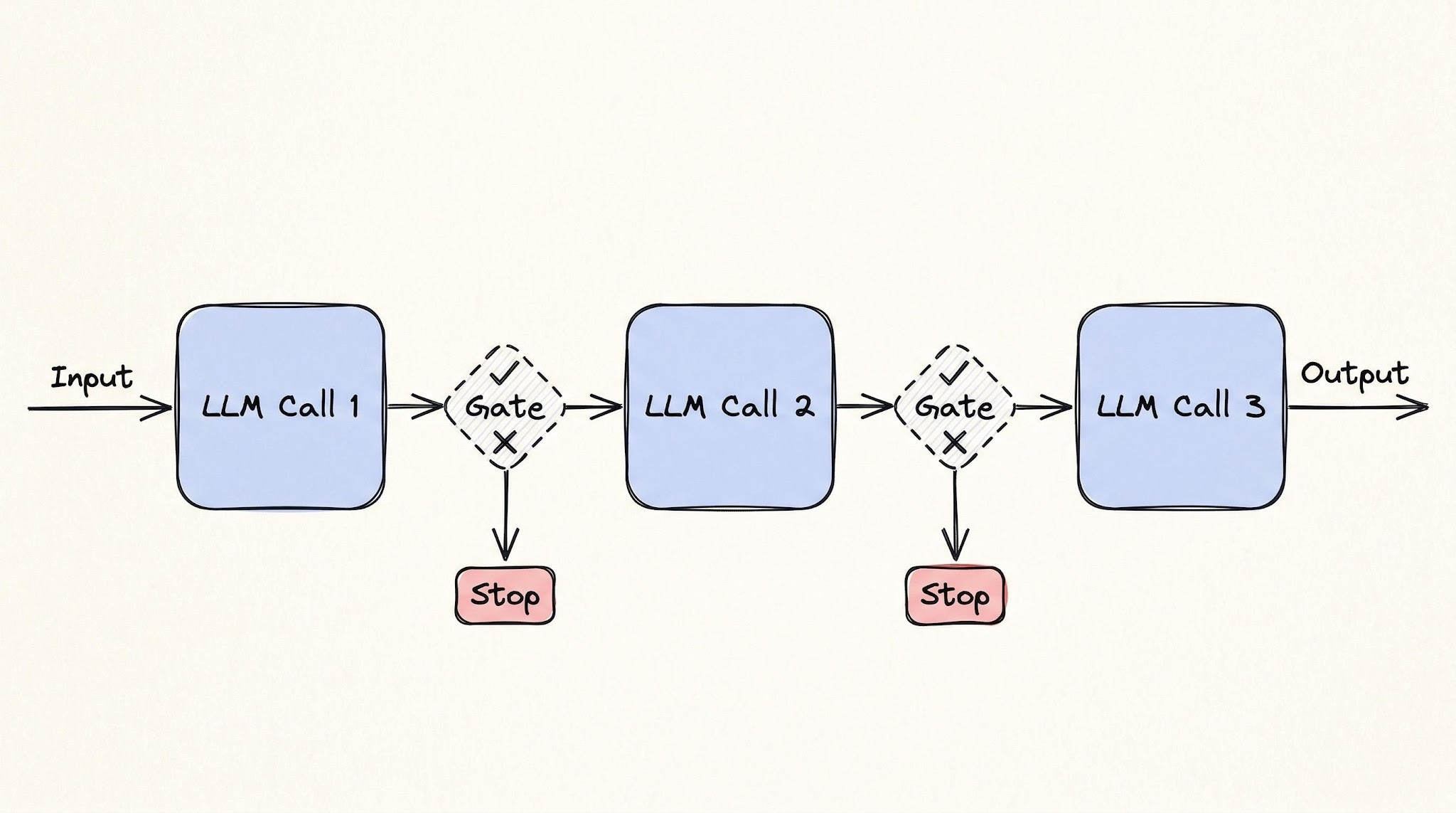
Break a task into a sequence of LLM calls. Each call takes the previous step's output, and a validation gate runs between them to make sure the result is good enough before moving on.
Mental model: a CI/CD build pipeline. A typical CI pipeline compiles → lints → tests → packages, and each step must pass before the next one runs. If tests fail, the pipeline halts. Prompt chaining is the same shape, just with LLM calls instead of build steps.
Concrete example — legal contract review:
- Extract every clause from a contract.
- Classify each clause by risk level.
- Generate a summary of the high-risk items for a human to review.
Real products like Thomson Reuters CoCounsel and Robin AI run variations of this pipeline. Each step gets a narrow, focused prompt, and a validation gate checks the output before passing it forward.
Tradeoffs:
- Latency grows linearly. Five steps = five round-trips to the model.
- Errors compound. If step 2 misclassifies a clause, steps 3–5 are processing bad input. Validation gates catch failures early — but only the failure modes you thought to write checks for.
2. Routing
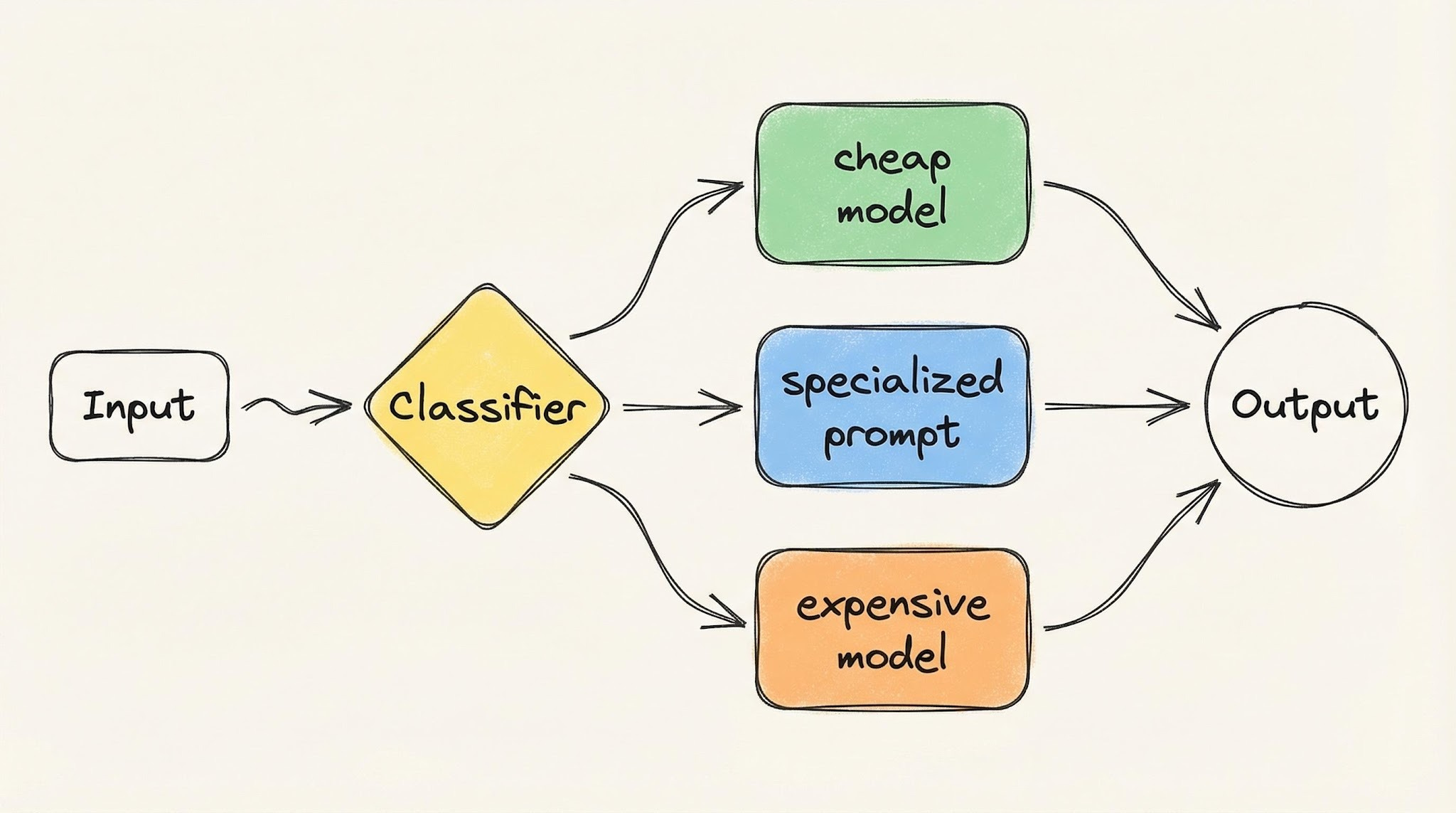
Classify the input first, then send it to the right handler — which could be a different prompt, a different model, or a different sub-workflow. Each handler is purpose-built for one type of input.
Mental model: a hospital front desk. A patient walks in, the front desk checks their symptoms, and routes them to the right doctor. The front desk doesn't treat anyone, and the doctor doesn't check people in. Specialization at every station.
Real-world examples:
- Sierra AI routes across 15+ models. Classification tasks go to one model, tool calling to another, response generation to a third.
- Intercom Fin routes each customer request based on what the customer wants and how they feel about it — sending some requests to an AI handler and others straight to a human agent.
The cost benefit is built in: simple queries hit cheap, fast models; complex ones hit the expensive, capable ones. You stop paying top dollar for work a smaller model handles fine.
Tradeoffs (one word): misclassification.
- A complex query routed to the cheap model produces a bad answer.
- A simple query routed to the expensive model burns money for no reason.
- The router is a single point of failure — its accuracy caps the accuracy of the entire system.
3. Parallelization
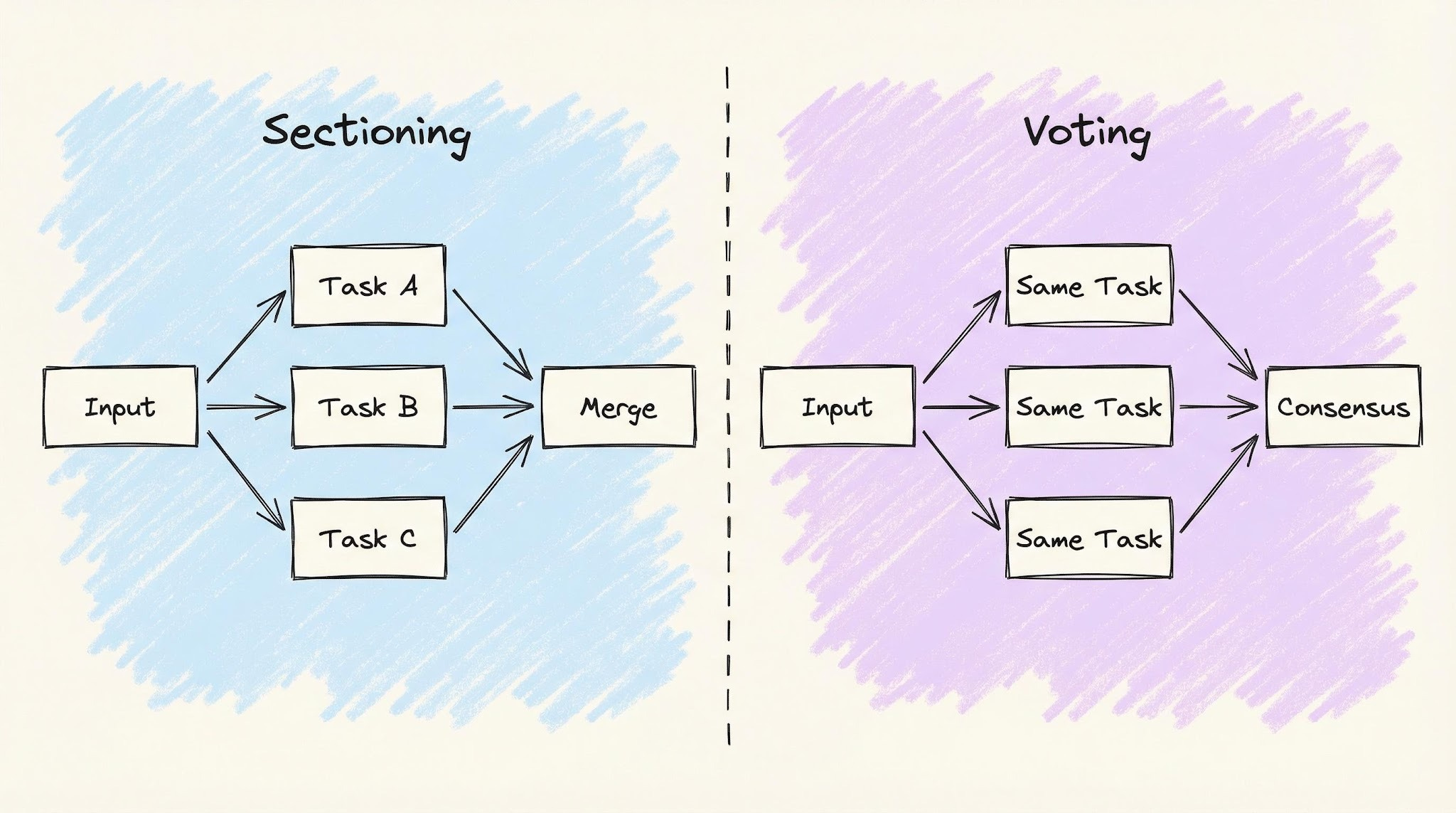
Run multiple LLM calls at the same time instead of one after another. There are two flavors that solve different problems:
Sectioning — split the task into independent subtasks, run them in parallel, and merge results.
Mental model: a construction crew. Electricians, plumbers, and carpenters all work in the same building simultaneously. Their work is combined at the end.
Real example: GitHub Advanced Security. CodeQL plus third-party tools like Snyk and Semgrep all scan the same pull request in parallel, each producing independent security alerts.
Voting — run the same task multiple times (often with different prompts) and combine the answers.
Mental model: a jury. Each juror sees the same evidence and forms an opinion; the group decides together.
Real example: a security review where three separate prompts independently analyze the same code change for vulnerabilities, and you only flag an issue if at least two agree. It costs more, but it produces fewer false alarms.
One-line distinction: sectioning gives each worker a different job; voting gives every worker the same job.
Tradeoffs:
- Cost multiplies with each parallel branch.
- Partial failures must be designed up front. If one branch fails, do you retry it? Proceed with the others? Fail the whole operation? There's no universal answer, and choosing wrong is expensive.
4. Orchestrator-workers
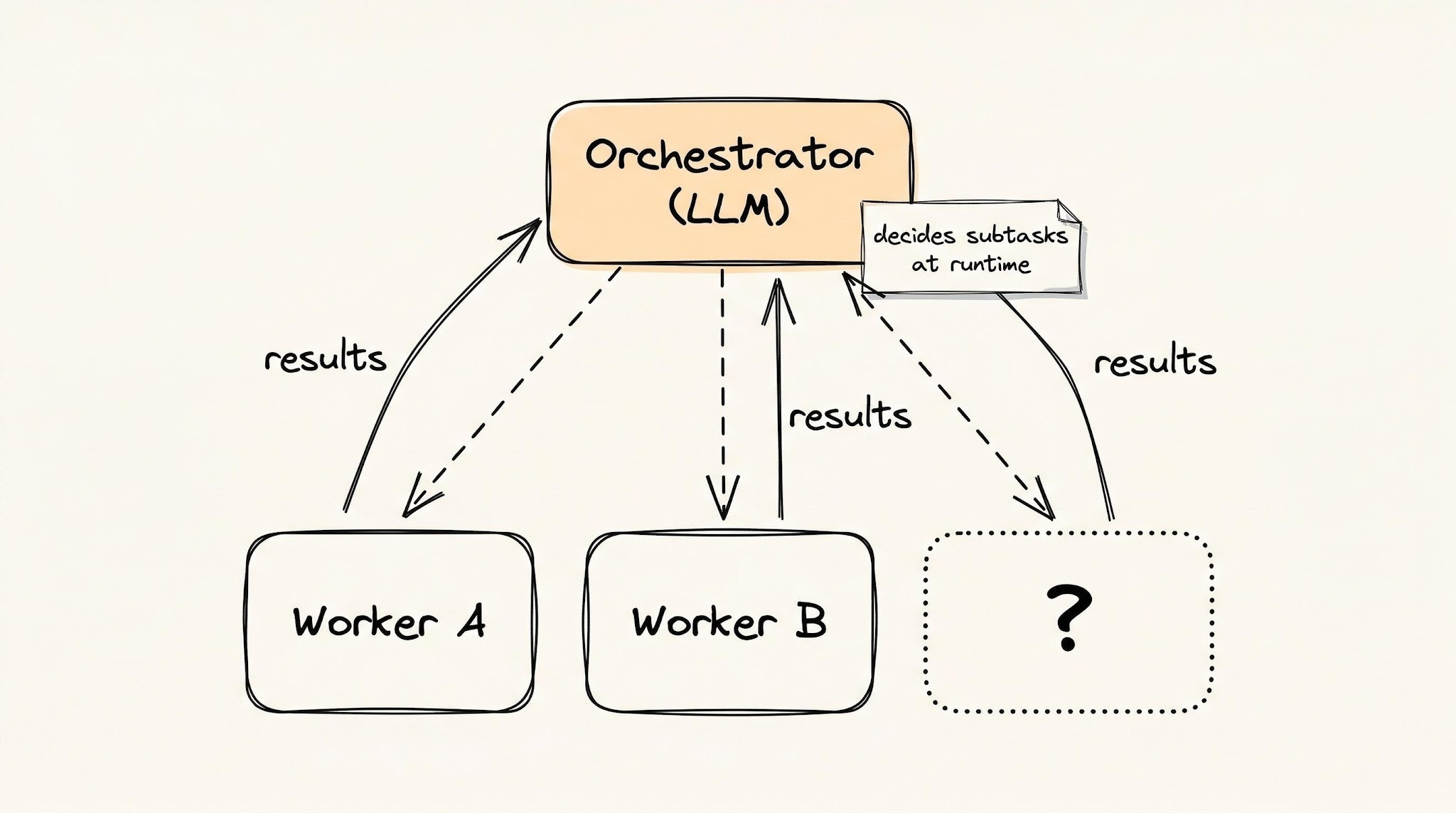
A central LLM (the orchestrator) breaks a task into subtasks, assigns each one to a worker LLM, and combines the results. The key difference from the previous three patterns: the subtasks aren't known in advance. The orchestrator figures them out as it goes.
Mental model: a general contractor building a house.
- They hire the right people, but they don't know every subcontractor they'll need upfront.
- The plumber finds a structural issue, so the contractor brings in a structural engineer.
- The plan changes as the project reveals new problems.
Real example: Cursor's agent mode. It can spin up different agents for different parts of a codebase — one adding tests, another updating documentation, a third refactoring shared utilities — and decide what's needed as the work proceeds.
You're trusting the LLM to figure out what work needs to be done, not just to do work you've already specified.
Important distinction: This uses several LLMs, but it is not a multi-agent architecture. A single central LLM stays in control of the whole process. In a true multi-agent system, agents can call each other directly without a central coordinator, and control can transfer between them.
Tradeoffs:
- The orchestrator can lose the plot — drift from the original goal.
- It tends to over-decompose, splitting simple tasks into too many subtasks.
- When workers finish faster than the orchestrator can combine results, the orchestrator itself becomes the bottleneck.
How the four workflow patterns compare
These four get progressively more powerful and more expensive:
- Chaining and routing — cheap and predictable. You know what's going to happen before it runs.
- Parallelization — saves time, costs more.
- Orchestrator-workers — handles problems you can't predict upfront, but introduces failure modes you also can't predict.
Most production systems should not need to go past parallelization. When they do, you start handing actual control to the model — that's the agent half of the spectrum.
Agent patterns: the LLM controls the flow
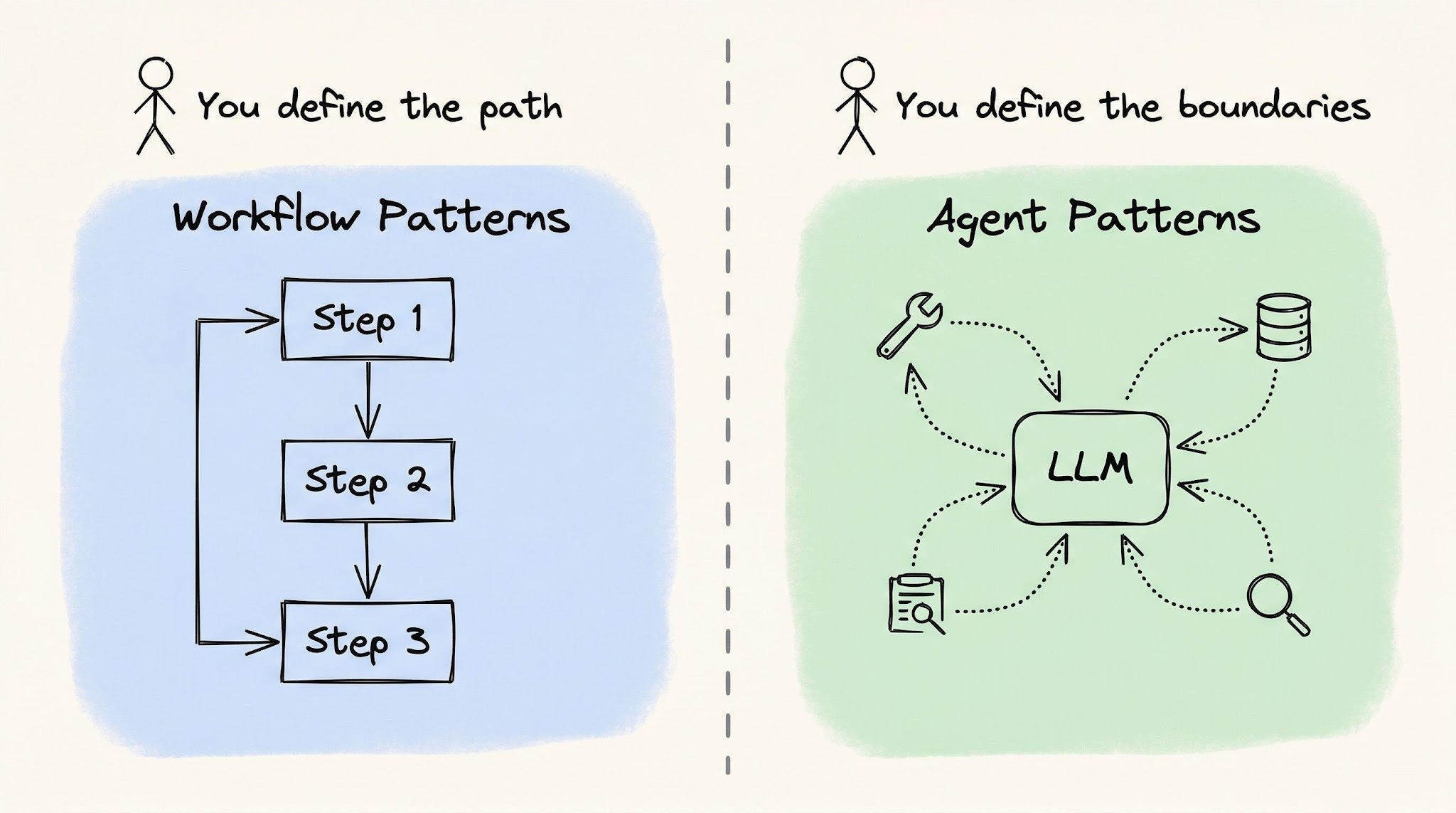
With agent patterns, you stop defining what happens and in what order. Instead, you define constraints:
- what tools are available,
- how much the model is allowed to spend,
- and when it should stop.
The model observes, reasons, and chooses what to do next. The "trust dial" shows up differently in each pattern: how much autonomy, over which actions, with which limits.
5. Reflection
Reflection is when the LLM generates output, reviews its own work, and then fixes the problems it just found — essentially a self-critique loop. (The post's detailed treatment of this pattern, plus patterns 6–9, sit behind the paywall and aren't included here.)
What's behind the paywall
The free portion ends partway through the Reflection pattern. The full post continues with:
- 6. Tool use — letting the LLM call external functions/APIs.
- 7. ReAct — interleaving reasoning steps with actions.
- 8. Planning — the model produces a plan, then executes it.
- 9. Evaluator-optimizer loop — adding a reliability layer with evaluation, iteration limits, and cost controls.
- A real-world AI code review pipeline case study that combines several patterns.
The single takeaway
Pick the simplest rung that works and only climb when the current rung visibly breaks. Direct API call → workflow → agent → multi-agent. Most teams over-shoot the ladder and pay for it in cost, latency, and weird failure modes that wouldn't exist on a simpler design.
Author
Neo Kim
Continued reading
Keep your momentum
MKT1 Newsletter
100 B2B Startups, 100+ Stats, and 14 Graphs on Web, Social, and Content
This is Part 2 of MKT1's three-part State of B2B Marketing Report. Where Part 1 looked at teams and leadership , Part 2 turns to what marketing teams are actually doing — what their websites look like, how they use social, and what "content fuel" they're producing. Emily Kramer u
Apr 28 · 10m
Lenny's Newsletter (Lenny's Podcast)
Why Half of Product Managers Are in Trouble — Nikhyl Singhal on the AI Reinvention Threshold
Nikhyl Singhal is a serial founder and a former senior product executive at Meta, Google, and Credit Karma . Today he runs The Skip ( skip.show (https://skip.show)), a community for senior product leaders, plus offshoots like Skip Community , Skip Coach , and Skip.help . Lenny de
Apr 27 · 7m

The AI Corner
The AI Agent That Thinks Like Jensen Huang, Elon Musk, and Dario Amodei
Dominguez opens with a claim that is easy to skim past but worth stopping on: the difference between elite founders and everyone else is not raw IQ or speed — it is that each of them has internalized a repeatable mental procedure they run on every important decision. The procedur
Apr 27 · 6m