System Design One (Issue #139)
Treat Your Resume Like a Product: Lessons From Rejecting Thousands at Meta
Unknown Author
Apr 27, 2026
Treat Your Resume Like a Product: Lessons From Rejecting Thousands at Meta
Source: System Design One (Issue #139) · Authors: Austen McDonald (guest) & Neo Kim · Date: Apr 15, 2026 · Original post
Author context: Austen McDonald spent ~10 years at Meta, chaired the mobile Hiring Committee, conducted 1,000+ interviews, and led the team that ingested 2M+ engineering resumes into Meta's ATS. Neo Kim runs the System Design newsletter (~234k subscribers).
The big mental model: a resume is a product, not a document
Most resume advice is junk — written by recruiters who've only seen a few hundred resumes, or by senior engineers who recycle anecdotes from their own MAANGO applications. Austen's framing is different and worth holding in your head as you read everything below:
Your resume is a landing page for your career. Like any landing page, it has multiple personas (target users) who arrive with different goals, different attention spans, and different decisions to make. If you don't design for each persona, the page fails to convert — meaning you don't get the interview.
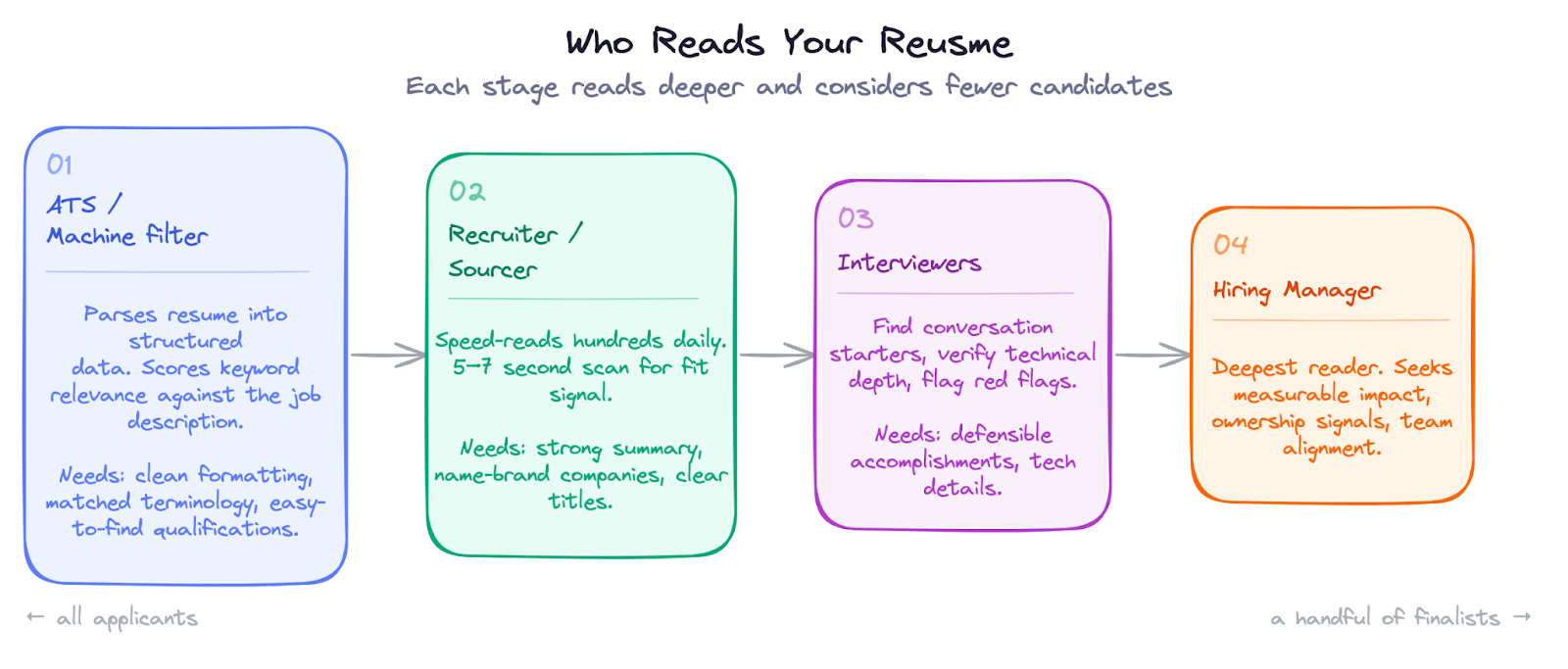
There are exactly four personas, and they read the resume in this order, each going progressively deeper:
- Machines (ATS / AI search)
- Recruiters / sourcers
- Interviewers (technical screeners, panel reviewers)
- Hiring managers
Most of this advice also applies to LinkedIn, since LinkedIn is literally a landing page.
Part 1 — Who actually reads your resume
1. Machines (Applicant Tracking Systems)
Unless someone hands your resume directly to a recruiter, software sees it first. The ATS parses your PDF into structured fields — name, contact, work history, education, skills — then scores you against the job description on keyword relevance, years of experience, and recruiter-defined criteria. High scores float to the top; low scores may never reach a human eyeball.
Modern systems use AI semantic search, so they understand that "built ML pipelines" and "machine learning infrastructure" mean the same thing. The good news: you don't need to keyword-stuff. The bad news: your accomplishments must be substantively relevant — vague claims won't score.
What machines need:
- Clean, parseable formatting. Tables, multi-column layouts, text boxes, icons, and images can break text extraction. Even creative section titles like "My Journey" instead of "Professional Experience" are risky because parsers look for expected headings.
- Easy-to-find minimum qualifications, since the bot is filtering on whatever the JD says.
- Keywords matching the job posting — written naturally inside accomplishments.
- Technologies named where they can be indexed (in bullets and a skills section).
Hot take from Austen: many career sites have a "Upload your resume to see if you're a fit" button. Iterate on your resume against that button until the site says you're a fit. Free feedback loop.
2. Recruiters / sourcers
Recruiters are speed-readers scanning hundreds of resumes a day. After basic machine filtering, a human sourcer skims your summary and a few bullets and makes an in/out call in 5–7 seconds.
They want two things at once:
- Candidates who meet stated requirements (years of experience, degrees, role titles).
- Candidates who fit the hiring manager's mental model of a "great hire" — usually signaled by name-brand companies, projects relevant to the team, or frequent use of the role's key technologies.
If you clear both bars, they either schedule a phone screen or pass you up the chain.
What recruiters need:
- Immediately see you meet minimum requirements.
- A quick visual path to something exciting — a brand name, a relevant project, a hot technology.
- Brevity. One page unless you're a CEO.
3. Interviewers
Two sub-types:
- Pre-screen reviewers (hiring manager or an IC committee) approve the resume before a technical screen is scheduled. Treat them like technical recruiters — same needs.
- Technical screeners look for conversation starters and signals that you'd contribute to the team.
- Onsite / behavioral interviewers gauge your level by the business impact you've driven. They also hunt for red flags: short stints, performance-related gaps.
What interviewers need:
- Accomplishments that look like the work the team does.
- Evidence you can defend each claim under scrutiny — meaning real technical detail.
- Signals of technical depth and leadership.
- A minimum of reasons to be suspicious.
4. Hiring managers
Sometimes the first reviewer, almost always the last. By the time the resume reaches them they're looking at a handful of finalists, so they read the most thoroughly. They know what their team needs.
What hiring managers need:
- Evidence your past work resembles what they're hiring for.
- Measurable impact at appropriate scope.
- Ownership and growth signals — can you self-direct, drive things to completion, and adapt fast? (Austen explicitly frames this as "ready for agentic coding" — the AI-era version of self-direction.)
- Clear visual hierarchy so they can find what matters.
The takeaway: don't put "everything you've ever done" on the page. Curate a story of impact aimed at these four personas.
Part 2 — Content that converts
Section order readers expect
- Contact info — name, email, LinkedIn (GitHub only if it's actually good)
- Summary — 2–3 sentences on who you are and why you fit
- Work experience — accomplishments, not duties
- Education — degrees, relevant coursework, honors
- Projects — side projects, OSS, portfolio
- Skills — the keyword soup for machines
This ordering can flex: experienced candidates de-emphasize education; new grads surface projects higher. But don't reinvent the order — readers expect it, and making them hunt is how you get rejected.
Contact information
Include name and email. Include a phone number if you want a call (recruiters will ask anyway). Include a LinkedIn URL — linkified in the PDF — because companies expect engineers to have one and frequently auto-ingest the data. Get a decent profile photo and cover photo on LinkedIn.
Anything else must be additive:
- GitHub — only if you have at least some recruiter-friendly repos that are deployed somewhere with good READMEs. An empty graveyard hurts you.
- Personal website — only if it actually works (lol) and is high-quality.
- US citizenship — note it in the contact section if it's not obvious from your resume and you're applying to US roles.
The summary — Austen's most opinionated take
Always include a summary, and put it at the top. Two or three sentences max, tailored to the role. Recruiters lean on it heavily.
⚠️ Don't let AI write it. AI summaries are an epidemic — vague, buzzword-laden, interchangeable. Recruiters spot them instantly. These all say nothing:
Results-driven Front End Engineer with 4+ years of experience building scalable, user-centric web applications. Proven track record of delivering high-quality code in fast-paced environments. Passionate about creating seamless user experiences and collaborating with cross-functional teams.
Dynamic and detail-oriented Front End Engineer with expertise in modern JavaScript frameworks. Adept at translating complex requirements into elegant, performant solutions...
Phrases like results-driven, passionate, cross-functional teams are filler — they describe everyone, which means they describe no one.
A better summary (Austen's example for a front-end engineer applying to a B2B SaaS company):
I make complex data feel simple. I'm a front-end engineer with 4 years of experience building B2B decision platforms at multiple fast-moving startups.
Why it works:
- Short. ("Every line decreases your readership by half." — his college technical writing instructor.)
- Interesting. Who doesn't want someone who makes complex data feel simple?
- Identifies you. Front-end, 4 years, startups — the reader instantly knows whether you're relevant.
- Connects to the role (B2B in this case).
Aside on the cute summary: something like "Assistant to my local Claude Code instance" is preferable to a buzzword soup because at least it shows personality. But you can do better unless your match to the role is so obvious it doesn't need selling.
Writing bullets that get read
Resume readers are hiring you to deliver business value with technology. Bullets must give them confidence you can do that.
Rules:
- Lead with results, not activities. Formula: "Delivered [business value] using [technology/approach]." The activity is the supporting clause, not the headline.
- Quantify and show scope. Percentages, dollars, user counts, latency, project length. Numbers imply difficulty.
- Treat bullets as interview prompts. Whatever you list will get asked about — make it interesting and defensible.
- Include leadership signals. Initiative, mentoring, driving projects — even without a manager title.
- Lead with your best, not chronology. Inside a single role, put the most relevant/impactful bullet first.
- Embed tech inside accomplishments. Mentioning React/Kafka/Postgres in a bullet boosts keyword ranking and gives proof — better than just listing it under "Skills."
Weak vs. strong bullets (the structural improvement is the lesson — copy the pattern, not the words):
| Weak | Strong |
|---|---|
| Worked on the checkout system and fixed bugs. | Reduced checkout abandonment by 12% by identifying and resolving a race condition in the payment flow using React and Stripe's API. |
| Responsible for migrating the database to a new system. | Led a 6-month migration of 50M records from MySQL to PostgreSQL, coordinating across 3 teams with zero downtime. |
| Helped improve the CI/CD pipeline. | Cut deploy times from 45 min to 8 min by parallelizing test suites and implementing Docker layer caching, adopted by 12 engineering teams. |
| Mentored junior engineers on the team. | Mentored 3 junior engineers through their first production launches, with one promoted to mid-level within 8 months. |
Projects & proof of work
Projects are mostly marginal on a resume. They might tip a fence-sitting recruiter, but rarely move the needle on their own. Two cases where they matter:
- You're a new grad with little paid work — projects are your experience.
- You're pivoting into a new technical area (e.g., AI) where you don't have paid experience yet.
Otherwise, prioritize paid work and keep projects compressed.
- GitHub: include only if your contribution chart looks like a Christmas tree or you have polished, deployed repos with READMEs and tests. Pin your best. If it's a graveyard, leave it off.
- Side projects: show initiative but aren't the same as production work. Skip generic descriptions like "AI-powered todo app in React Native." Try "Maximalist AI approach to running my life — a case study in build-fast-with-Claude-Code development." Personality > template.
- Technical writing / blog: worth including. Demonstrates communication and depth. Make it easy to find your 2–3 best pieces.
The skills section
Most overlooked, still serves a purpose: it's the keyword soup that ensures you surface in searches and reassures recruiters when a hiring manager says "They must know React."
Rules:
- Only list what you can actually discuss — interviewers may probe depth on anything you list.
- Don't list everything you've ever touched. (Austen jokes he should charge AI tokens for resumes that include "HTML.")
Tailoring per job
Most people don't tailor because it's too much work, especially when applying to dozens of roles. Pragmatic approach:
- Tailor for big-name companies, where the extra effort pays off.
- Maintain a small set of versions — e.g., one for senior IC roles, one for tech-lead roles, one highlighting AI projects, one for full-time data engineering.
To tailor effectively, mine the job description:
- Repeated terms matter most. "Distributed systems" mentioned 3× outweighs "familiarity with GraphQL" mentioned once.
- Separate must-have from wish-list. Real requirements usually live at the top of the bullets; the rest is padding.
- Identify the core problem they're hiring for. "Own our data pipeline" → reliability + ownership signals. "Help us scale to 10x users" → performance + system design. Mirror that language.
- Categorize each line as specific tech (Kafka — you have it or don't), general skill (leadership), or filler (strong communication skills — every JD has this; don't waste resume space).
Quick LLM trick: paste the JD and ask, "What are the top 10 concepts in this job description and what are they looking for in this candidate?" Then upload your resume and ask it to compare.
Tactics once you know what to tailor for:
- Adjust the summary to mirror the role's needs.
- Reorder sections. If you're applying to AI roles with only side-project AI experience, lift those projects above professional experience.
- Reorder bullets within each role — most relevant first.
- Expand or condense roles, or even drop distracting ones.
- Match and reorder skills.
Part 3 — Designing for ease of use
Formatting for both machines and humans
- Use simple formatting. Distribute as a PDF that exports cleanly to text. Sanity test: upload to Google Docs — if formatting breaks there, the ATS may misread it too.
- Keep it to one page. Like a product page, the key content needs to be "above the fold." Space-saving tricks:
- Margins as tight as ½″ on every side.
- Pack one line with company, title, dates.
- Older or shorter roles can collapse from bullets to a one-liner. The further down something sits, the less likely it's read — reduce fidelity gracefully.
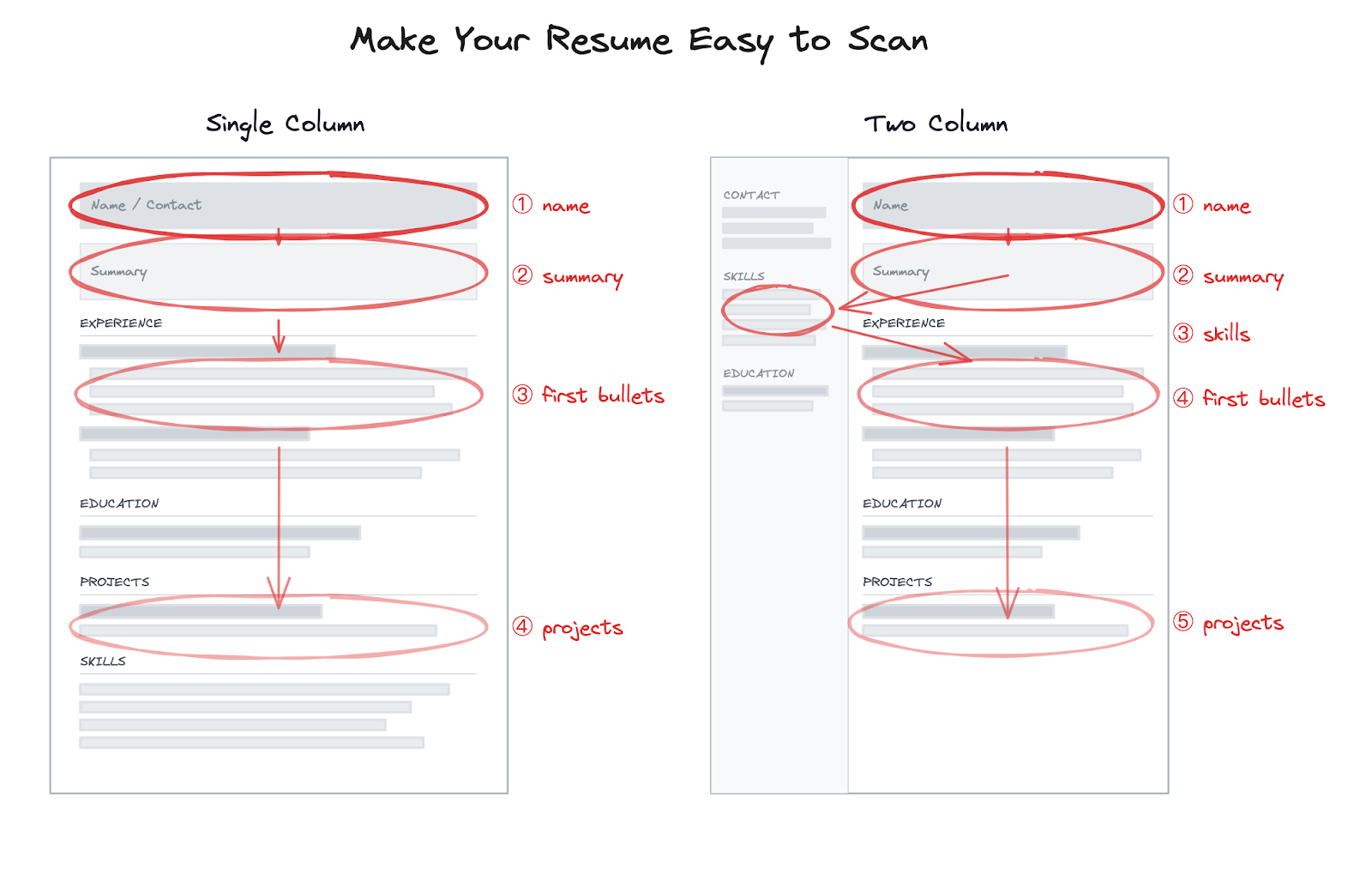
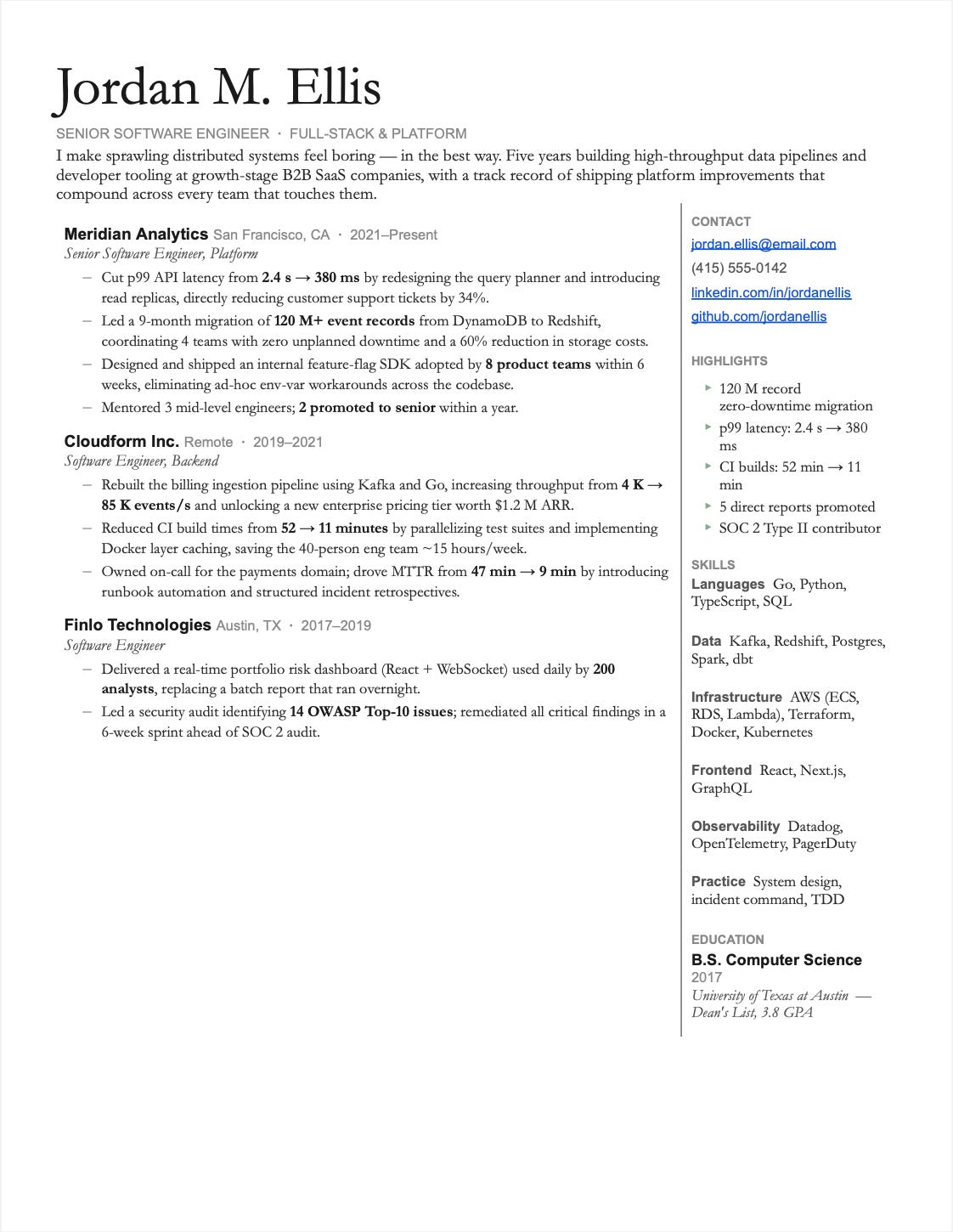
- Consider a two-column layout, with low-traffic content (contact, skills, education) in a narrow side column.
- Use formatting to guide the eye. Sub-bullets, bolding, hierarchy. If every line looks equally weighted, eyes glaze over.
- Don't overthink templates. Nobody's hiring you because of a template. Pick something that fits the principles above and put your energy into the content.
Suggested templates
The post links two Google Docs templates that follow these guidelines:
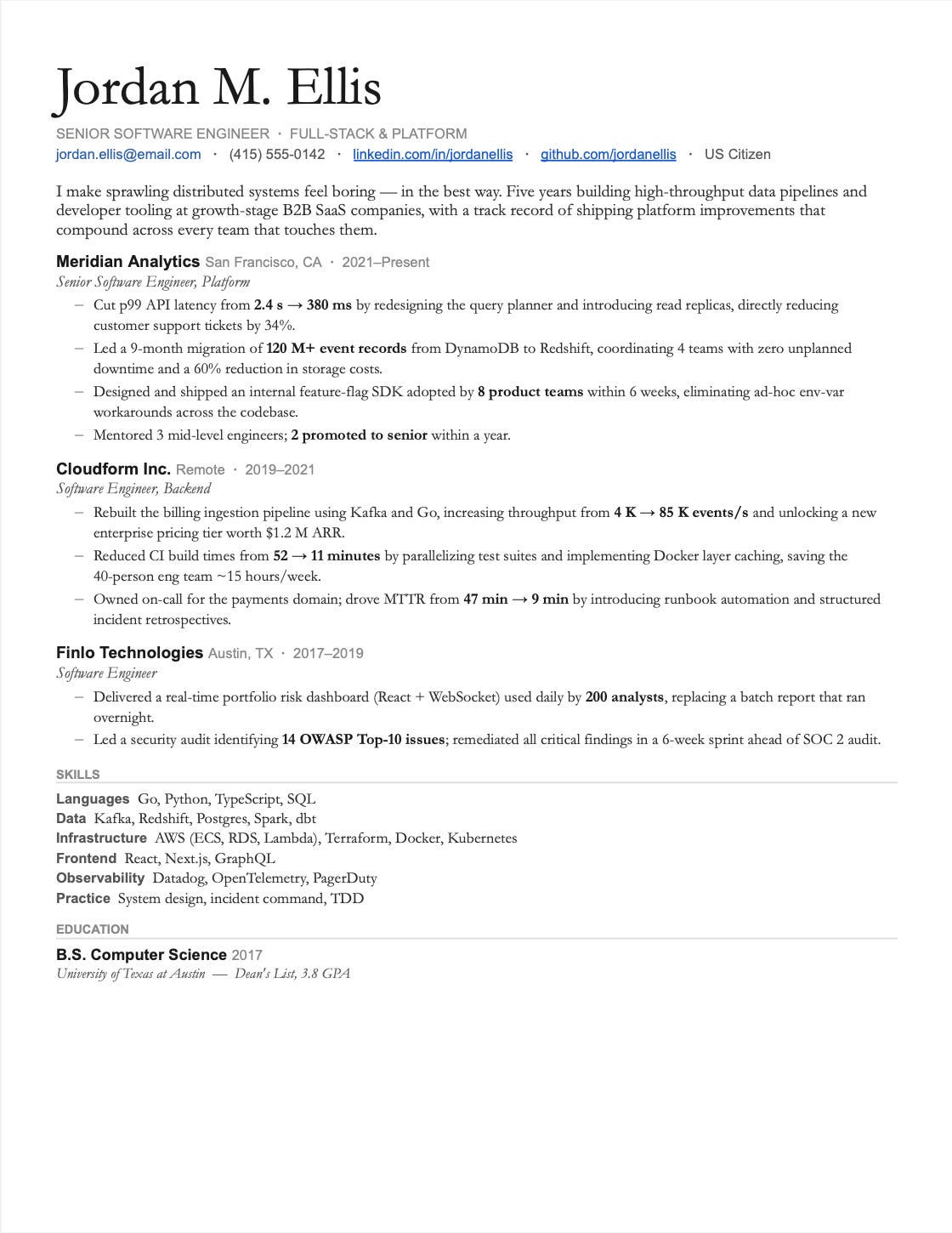
- Single-column template
- Two-column template — saves notably more vertical space.
Making your experience scannable
- Surface household-name companies so the eye lands on them fast. Recruiters notice brand recognition quickly, and they only read the first part of each section.
- Surface minimum qualifications (education, years of experience) prominently, ideally in the summary.
- Prioritize recent / flagship experience. Give it more vertical space; compress older roles by removing or shortening bullets.
Sticky situations — gaps and layoffs. Minimize them so they don't trip the screen-out filter before you can speak to a human:
- Drop month indicators to hide intra-year gaps.
- If recently let go, don't add an end date to the current role yet. You can usually get away with this for 6–12 months — resumes are expected to lag.
- If you have stints at startups that folded, add a brief one-liner explaining what happened. Without context, reviewers assume it reflects on you.
Part 4 — Common mistakes & what to avoid
Mistakes that get you cut
- Too many buzzwords. Results-driven, synergy, leverage — meaningless. The test: if the bullet still makes sense when swapped into another candidate's resume, it's too generic.
- Zero impact. Activities without outcomes. "Worked on the payments team" tells the reader nothing — what shipped, what changed?
- Hard-to-read templates. Fancy fonts and aesthetic-first layouts are risky outside design roles. The reader should make a decision in ~3 seconds.
- Irrelevant information. Drop the 2015 lifeguarding job from a senior engineer's 2026 resume. Every non-serving line is a place the reader might stop.
- Wall of text. No hierarchy, no bolding, no visual breaks → reviewer closes the tab.
What NOT to include
- Unnecessary personal info — age, photo (in the US), full address. Bias risk and wasted space.
- Irrelevant jobs — unless they show transferable skills or fill a gap. A backend hiring manager doesn't care about retail from 10 years ago.
- Social media links — except LinkedIn. Twitter/Instagram/TikTok are noise unless you're applying to a social-media company and they showcase relevant work.
- "References available upon request" — everyone assumes this. Pure filler.
- Hobbies and interests — only if directly relevant (e.g., listing game development when applying to a gaming company).
- ATS tricks — like white-text keyword stuffing. Recruiters and the engineers who built the ATS know these tricks. They despise them.
Closing thoughts
Your resume is never done — and that's liberating. You don't need a perfect resume to start applying; you need a good enough resume that you improve over time.
Treat it like a product:
- Ship, get feedback, iterate. If an interviewer asks about something on your resume, consider adding it. If you bombed a question about a listed accomplishment, either cut it or prepare better next time.
- Get human feedback early and often — friends, mentors, peers, ideally someone who has actually hired engineers.
- Iterate ruthlessly. Coaching clients usually need 3–4 revisions before their resume is good.
The takeaway: Your resume has four readers — machines, recruiters, interviewers, hiring managers — and each needs something different. Build for all of them. Make it scannable. Quantify your impact. Then iterate.
Now go get that interview.
Author
Unknown Author
Continued reading
Keep your momentum
MKT1 Newsletter
100 B2B Startups, 100+ Stats, and 14 Graphs on Web, Social, and Content
This is Part 2 of MKT1's three-part State of B2B Marketing Report. Where Part 1 looked at teams and leadership , Part 2 turns to what marketing teams are actually doing — what their websites look like, how they use social, and what "content fuel" they're producing. Emily Kramer u
Apr 28 · 10m
Lenny's Newsletter (Lenny's Podcast)
Why Half of Product Managers Are in Trouble — Nikhyl Singhal on the AI Reinvention Threshold
Nikhyl Singhal is a serial founder and a former senior product executive at Meta, Google, and Credit Karma . Today he runs The Skip ( skip.show (https://skip.show)), a community for senior product leaders, plus offshoots like Skip Community , Skip Coach , and Skip.help . Lenny de
Apr 27 · 7m

The AI Corner
The AI Agent That Thinks Like Jensen Huang, Elon Musk, and Dario Amodei
Dominguez opens with a claim that is easy to skim past but worth stopping on: the difference between elite founders and everyone else is not raw IQ or speed — it is that each of them has internalized a repeatable mental procedure they run on every important decision. The procedur
Apr 27 · 6m