ByteByteGo Newsletter
EP210: Monolithic vs Microservices vs Serverless — and Other System Design Refreshers
ByteByteGo
Apr 11, 2026
EP210: Monolithic vs Microservices vs Serverless — and Other System Design Refreshers
Source: ByteByteGo Newsletter · Author: ByteByteGo · Date: 2026-04-11 · Original article
This issue is a system-design "refresher" that walks through five separate topics. Each one is short, but each contains a useful mental model worth keeping. Here's the full tour.
1. Monolithic vs Microservices vs Serverless
The article frames these three not as competitors, but as choices on a spectrum of how much you split your system up and who runs the servers.
The monolith — one of everything
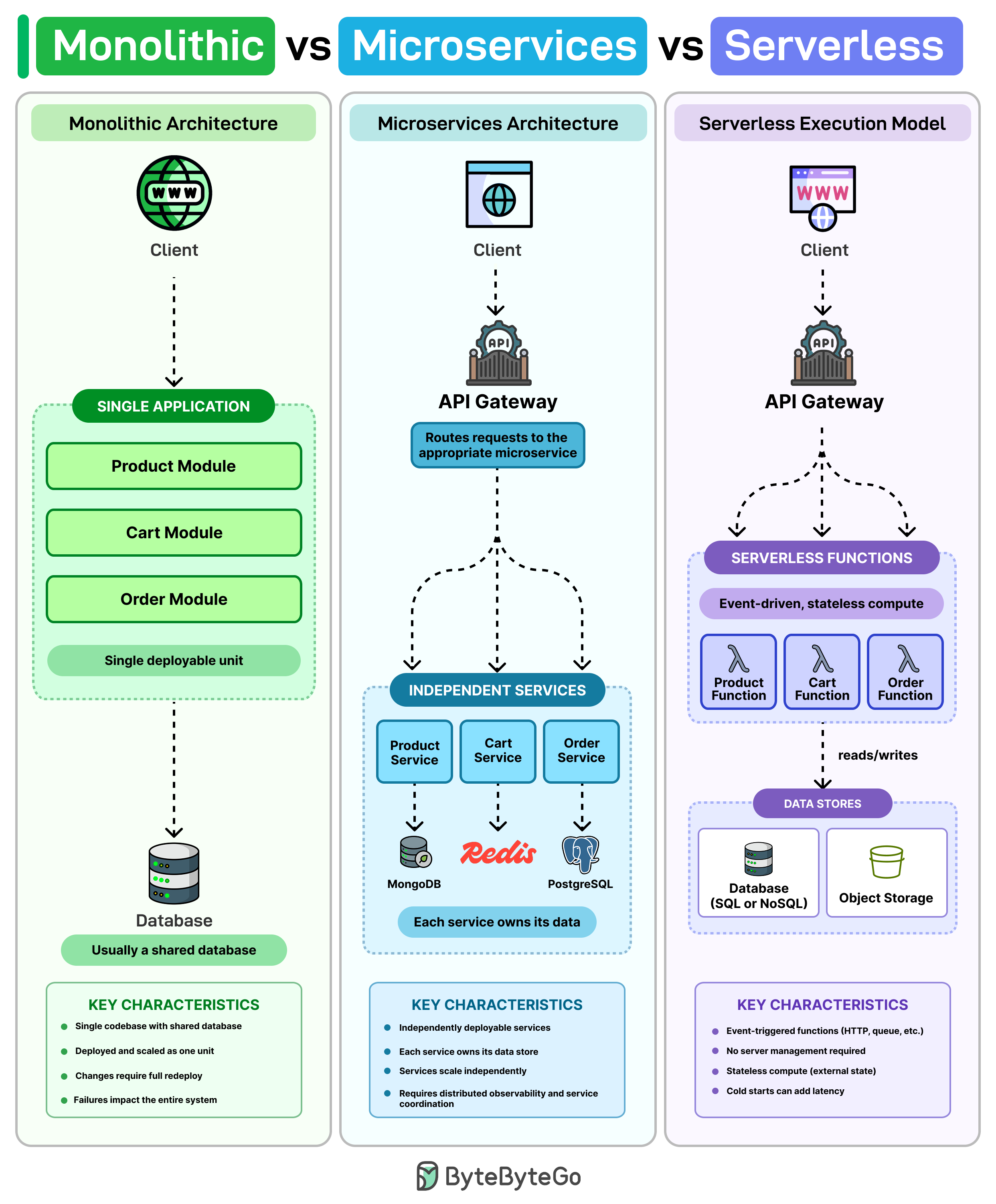
A monolith is usually one codebase, one database, and one deployment. Think of it as a single shipping container that holds your whole app: web layer, business logic, and data access all packaged together and deployed as one unit.
For a small team, this is often the simplest path. You only have one repo, one CI pipeline, one place to deploy, and one database to query. You can ship a feature end-to-end without coordinating across teams or services.
The downside shows up as the codebase grows. The article gives a concrete example: a tiny fix in the cart code still requires redeploying the whole app. And because everything runs in the same process, one bad release can take down everything with it — the checkout bug also kills product browsing and account login.
Microservices — break it up by capability
Microservices address that by splitting the system into separate services, each owning one piece of business capability. In the article's example: Product, Cart, and Order each become their own service. They:
- Run on their own (separate processes, often separate machines).
- Scale separately — if Cart gets hammered on Black Friday, you scale only Cart, not Product.
- Often manage their own data (each service has its own database, so teams can't reach into each other's tables).
The big win: you can ship a change to Cart without touching or redeploying the rest of the system. Releases become smaller, blast radius shrinks.
The trade-off is operational complexity. Now you have many moving parts talking over the network, so you typically need:
- Service discovery — how does Cart find the current address of the Order service when both can move around?
- Distributed tracing — when a single user request flows through five services, you need a way to stitch the logs together to debug.
- Request routing — something (an API gateway, a service mesh) has to direct incoming traffic to the right service.
Serverless — don't manage servers at all
Serverless is a different model entirely. Instead of running services on machines you provision, you write functions that run only when something triggers them (an HTTP request, a file upload, a queue message, a schedule). The cloud provider handles the scaling — from zero to thousands of concurrent executions — automatically. In many cases you only pay when those functions actually run, so an idle service costs nothing.
But serverless has its own pain points the article calls out:
- Cold starts: if a function hasn't run in a while, the first invocation has to spin up a new runtime, adding latency.
- Debugging is messy: dozens of small stateless functions are harder to reason about than a single process with a stack trace.
- Vendor lock-in: the more you wire your code into one cloud's runtime, triggers, and managed services, the harder it is to switch later.
The realistic takeaway
Most production systems don't pick just one. The pattern the article describes is layered:
- A monolith at the core for the main product.
- A few services carved out where you specifically need independent scaling or faster, isolated deploys.
- Serverless showing up later for things like notifications, background jobs, or integrations — the bursty, event-driven edges of the system.
The lesson: architecture style isn't a religion, it's a tool you reach for when the specific pain it solves shows up.
2. CLI vs MCP — how AI agents talk to tools
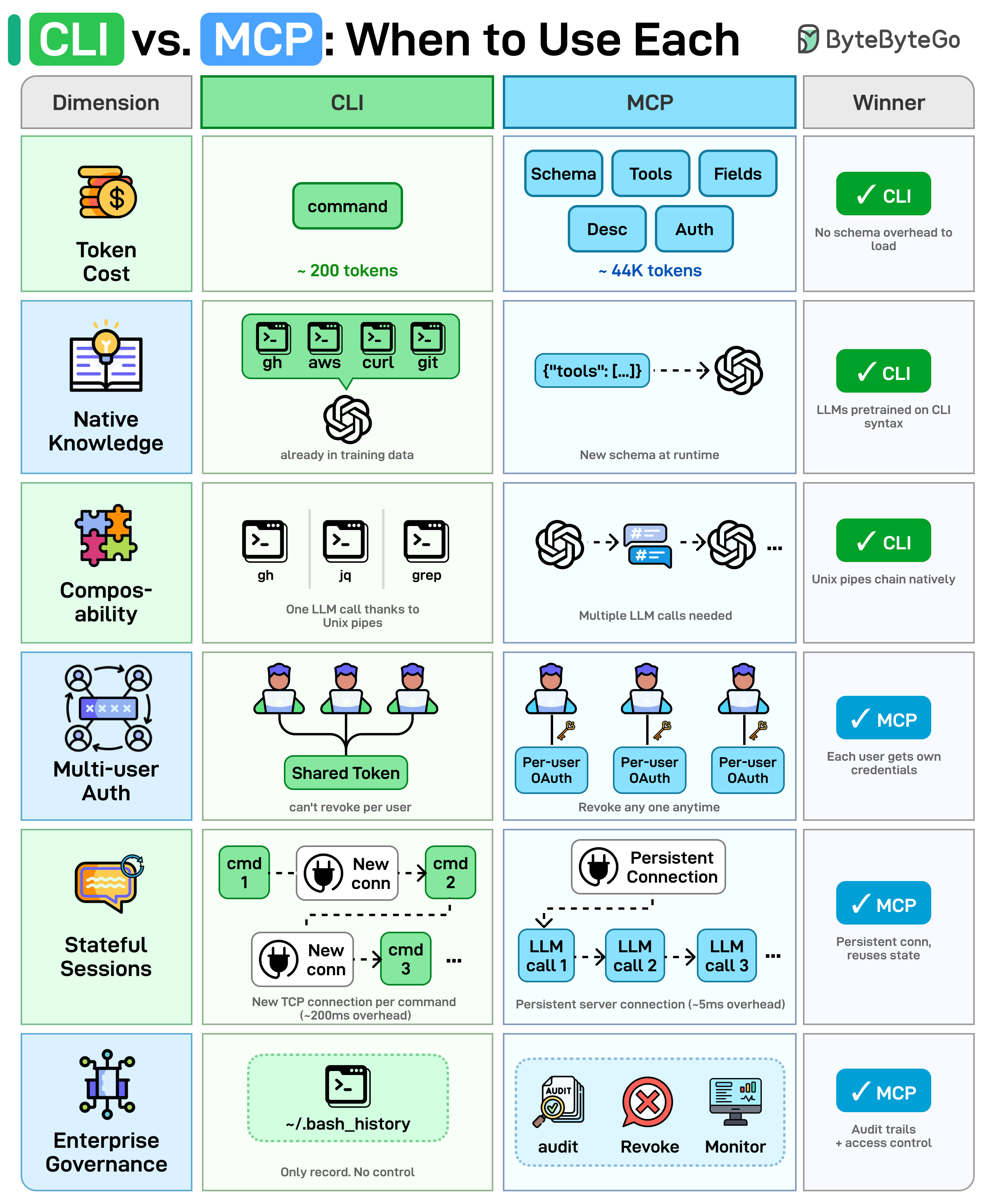
AI agents need to talk to external tools (GitHub, databases, file systems, etc.). They generally have two options: shell out to a CLI (command-line interface — the same git, gh, jq, curl humans use), or call an MCP server (Model Context Protocol — a standardized way to expose tools to LLMs as JSON-described actions). Both ultimately call the same underlying APIs; the difference is how the agent invokes them. The article compares them across six dimensions:
- Token cost. MCP must load the full JSON schema (tool names, descriptions, field types) into the model's context window before any work begins. CLI needs no such schema — the model already knows the syntax — so it saves context window space.
- Native knowledge. LLMs were trained on billions of CLI examples found across the web, so they're fluent in
git,grep,awk, etc. MCP schemas are custom JSON the model is encountering for the first time at runtime, with no prior training signal to lean on. - Composability. CLI tools chain together with Unix pipes — something like
gh ... | jq ... | grep ...runs as a single command in one LLM call. MCP has no native chaining; the agent has to orchestrate each tool call separately, paying a round-trip per step. - Multi-user auth. CLI agents typically inherit one shared token (whatever's in the environment). You can't revoke access for a single user without rotating everyone's key. MCP supports per-user OAuth, so each user gets their own credential and revocation is granular.
- Stateful sessions. A CLI invocation spawns a new process and a new TCP connection for each command — no reuse. MCP keeps a persistent server with connection pooling, which matters for performance when you call tools repeatedly.
- Enterprise governance. CLI's only audit trail is something like
~/.bash_history— basically nothing. MCP provides structured audit logs, access revocation, and monitoring built into the protocol — much better for regulated environments.
The implicit message: CLI wins for raw efficiency and Unix-style composability; MCP wins for security, multi-tenant deployments, and enterprise auditability.
3. Comparing 5 Major Coding Agents
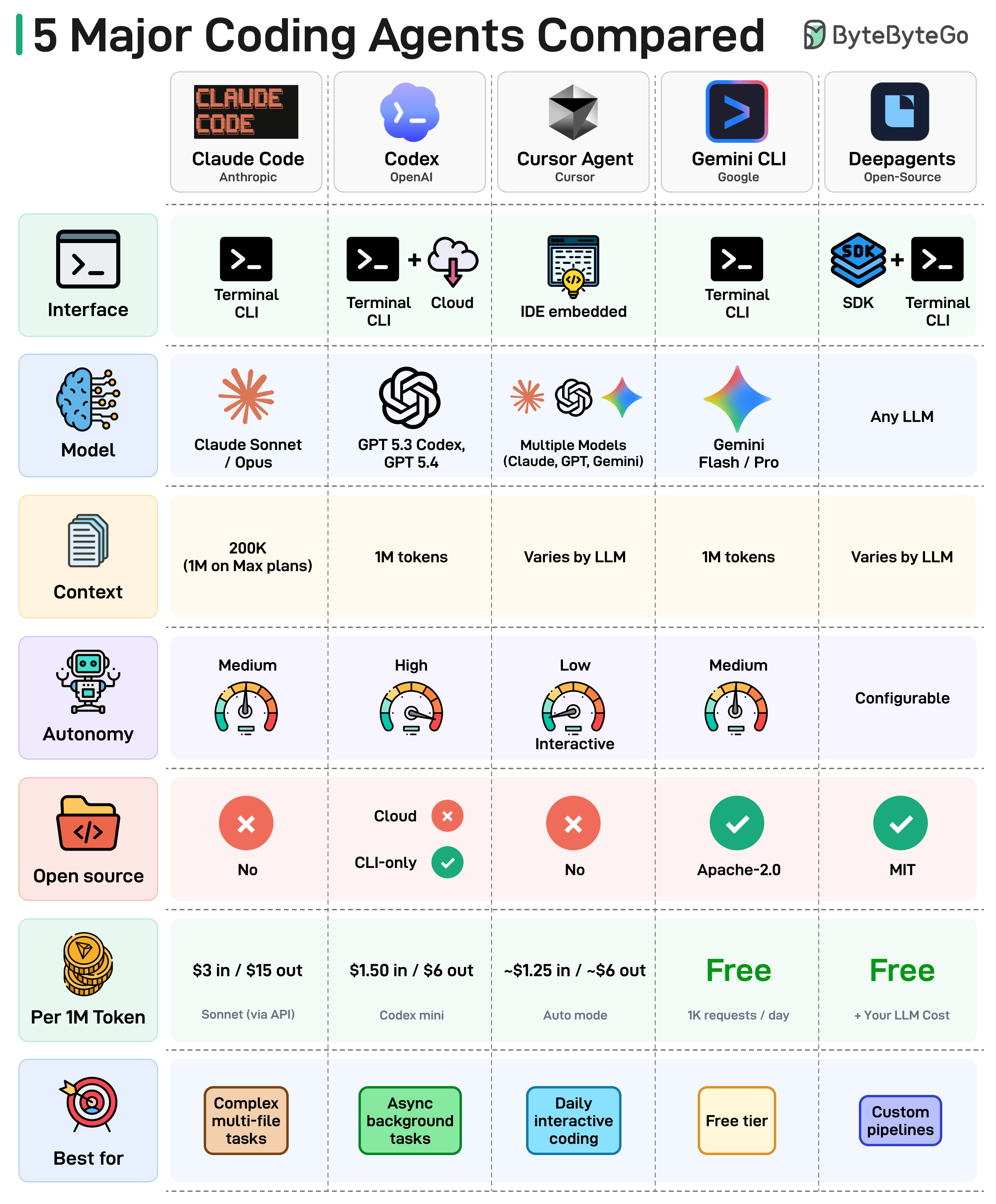
The article's diagram compares five leading coding agents across interface, model, context window, autonomy, and pricing. Five takeaways from the landscape:
- The terminal is the new IDE. Most coding agents now live in your terminal, not inside an editor. The command line has come back as the default agent surface.
- Context windows are getting massive. From 8K tokens to 1M tokens in just two years. Agents can now reason over an entire codebase in a single prompt, which fundamentally changes what kind of refactors and migrations are possible.
- Autonomy is a spectrum. Some agents run fully async in the background and report back. Others keep a human in the loop on every edit. Teams are still figuring out where on that dial they're comfortable.
- Open source is gaining ground. The OSS coding-agent ecosystem is maturing fast, giving teams full control over their toolchain instead of being locked to a vendor.
- Pricing varies wildly. From completely free (Gemini CLI, Deep Agents) up to $15 per 1M output tokens. Always check the cost row before committing — token bills add up fast on agents that run autonomously.
There's no single winner; the right agent depends on workflow, budget, and how much autonomy you're willing to delegate.
4. Essential AWS Services Every Engineer Should Know
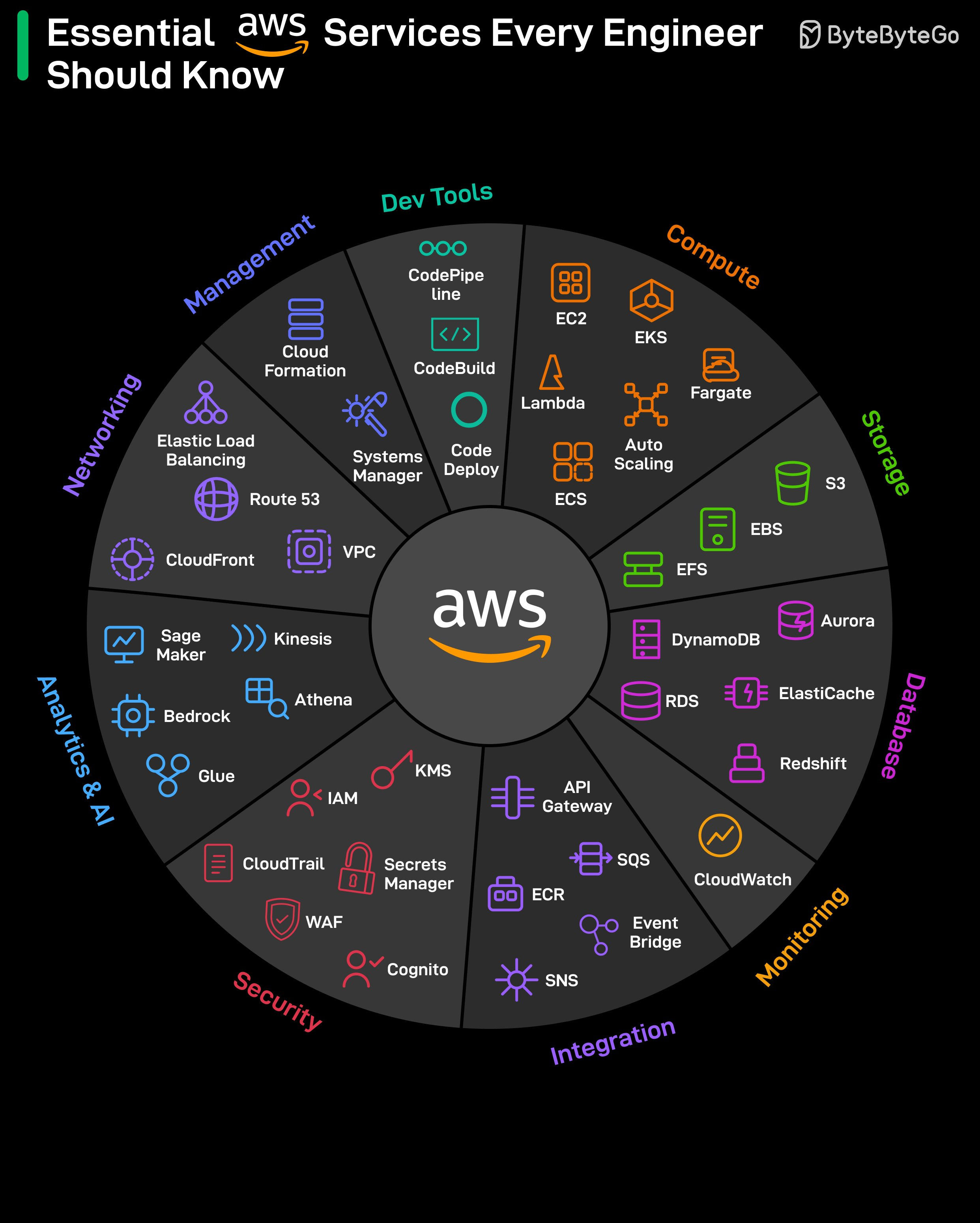
AWS has 200+ services, but most production systems use a small subset. The article sketches a typical request path: API Gateway → ALB (Application Load Balancer) → Lambda or ECS → DynamoDB → ElastiCache (cache layer). Each service is straightforward in isolation; the hard part is deciding where each one fits.
Categories worth knowing:
- Starting points: EC2 (virtual machines) and S3 (object storage) — almost everyone begins here.
- The "you'll learn these when things break" tier: CloudWatch (logs and metrics, i.e. observability), IAM (access control), and KMS (key management for encryption). They get ignored at first and become urgent during the first real incident.
- Networking — the confusing layer. VPC (virtual networks), subnets, security groups, Route 53 (DNS), and CloudFront (CDN) sit underneath everything. When something is misrouted, the error messages are notoriously unhelpful.
- Databases — choices that are hard to reverse. RDS (managed relational), DynamoDB (managed NoSQL key-value), and Aurora (Amazon's high-performance MySQL/Postgres) each solve different problems. Switching later means redesigning a lot of what you've already built, so the upfront pick matters.
- Integration / messaging — same warning. SQS (queues — one consumer per message), SNS (pub/sub fan-out — many subscribers per message), and EventBridge (event routing with rules and filters) each fit a different pattern. Pick the wrong one and the failure mode usually only shows up under load.
- AI services: SageMaker for training and hosting your own ML models, Bedrock for calling foundation models (Claude, Llama, etc.) directly via API.
- Infrastructure & deployment: CloudFormation for infrastructure as code (declare your stack in a YAML/JSON template), CodePipeline for CI/CD. Once set up, deployments run with no manual steps.
5. JWT Visualized
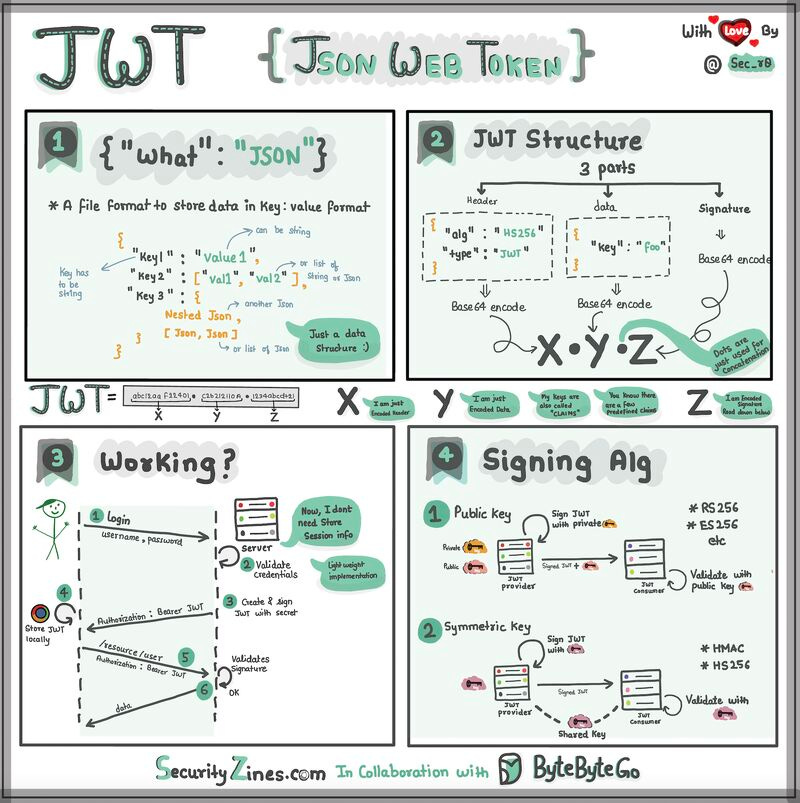
The article explains JWT (JSON Web Token) using a "special box" analogy — useful for beginners and worth keeping verbatim because the analogy does the explanatory work.
A JWT is a box with three parts inside: a header, a payload, and a signature.
- Header — like the label on the outside of the box. It says what type of token it is and how it's secured (which signing algorithm). It's written in JSON — a way of organizing information using
{ }and:. - Payload — the actual message. This is the data you want to send: user id, name, role, expiry timestamp, etc. Also JSON, so it's easy to read and work with.
- Signature — what makes the JWT secure. It's like a special seal only the sender knows how to create, generated from a secret. The signature ensures nobody can tamper with the contents without the sender knowing — if any byte of the header or payload changes, the signature stops matching.
When the client sends the JWT to a server, the server reads the header and payload to know who you are and what you're allowed to do, and verifies the signature to confirm nothing was modified in transit.
The original ends with an open question: when should you use JWT for authentication, and what are the alternatives? (Common alternatives include opaque session tokens stored server-side, OAuth access tokens, and API keys — JWT shines when you want stateless verification across multiple services without a shared session store.)
Bottom line
The thread tying this issue together is match the tool to the actual problem: pick monolith / microservices / serverless based on the pain you're feeling, pick CLI vs MCP based on whether you care more about token efficiency or governance, pick AWS services with a clear eye on which choices are reversible and which aren't, and use simple mental models (boxes, seals, shipping containers) to keep otherwise-abstract systems concrete.
Author
ByteByteGo
Continued reading
Keep your momentum
MKT1 Newsletter
100 B2B Startups, 100+ Stats, and 14 Graphs on Web, Social, and Content
This is Part 2 of MKT1's three-part State of B2B Marketing Report. Where Part 1 looked at teams and leadership , Part 2 turns to what marketing teams are actually doing — what their websites look like, how they use social, and what "content fuel" they're producing. Emily Kramer u
Apr 28 · 10m
Lenny's Newsletter (Lenny's Podcast)
Why Half of Product Managers Are in Trouble — Nikhyl Singhal on the AI Reinvention Threshold
Nikhyl Singhal is a serial founder and a former senior product executive at Meta, Google, and Credit Karma . Today he runs The Skip ( skip.show (https://skip.show)), a community for senior product leaders, plus offshoots like Skip Community , Skip Coach , and Skip.help . Lenny de
Apr 27 · 7m

The AI Corner
The AI Agent That Thinks Like Jensen Huang, Elon Musk, and Dario Amodei
Dominguez opens with a claim that is easy to skim past but worth stopping on: the difference between elite founders and everyone else is not raw IQ or speed — it is that each of them has internalized a repeatable mental procedure they run on every important decision. The procedur
Apr 27 · 6m